Bank statements only
Convert bank statements to Excel, CSV, or QuickBooks
Upload a PDF or photo of your statement and download every transaction as Excel, CSV or a QuickBooks file.
- Checking, savings and credit union statements, as a PDF or a photo
- Balances checked, so you see whether every row adds up
- Not supported: Not for receipts, invoices, IDs or letters. Use Document OCR
- 20,000+ users
- Excel, CSV and JSON
- QuickBooks, Quicken and Xero files
50 pages free. No card needed.
Drop your bank statement here
PDF, PNG, JPG, WebP
PDF up to 50 MB · images up to 20 MB
Tips for a clear photo
- Lay the page flat.
- Use even light, with no shadows.
- Turn off the flash to avoid glare.
- Fill the frame with the page.
No statement handy? Try a sample:
Encrypted upload. Private to you, deleted after 30 days. How we protect statements
Sample output
See the spreadsheet you get back
Left: the PDF your bank gives you. Right: the spreadsheet FastOCR gives back, with “Reconciled”, “Not reconciled” or “Could not be checked” so you can see whether the balances add up. Point at a row to see where it came from.
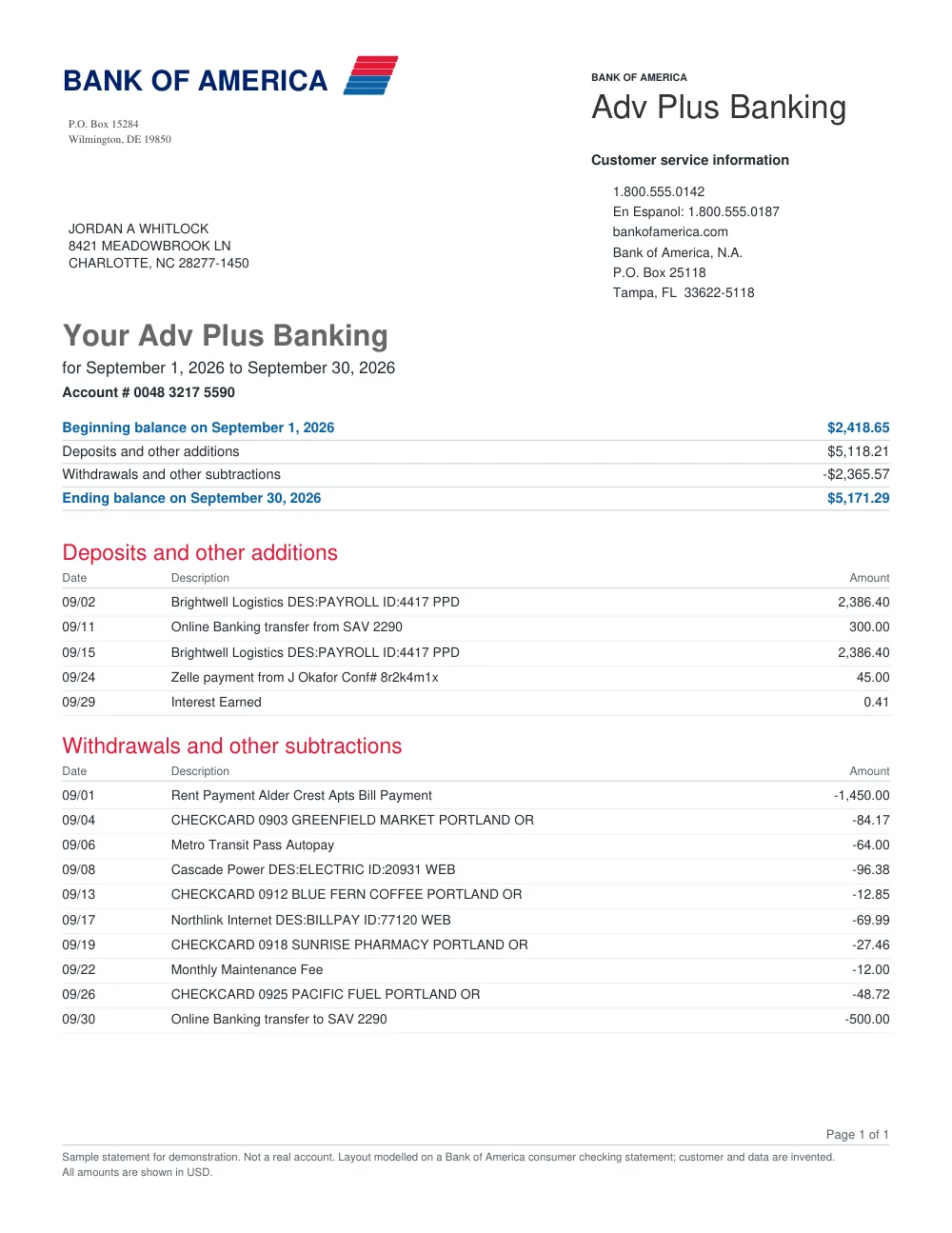
bank-of-america-statement-fastocr.xlsx
Reconciled| A | B | C | D | E | F | G | H | I | J | |
|---|---|---|---|---|---|---|---|---|---|---|
| Account | Date | Description | Reference | Money In | Money Out | Balance | Status | Notes | Page | |
| Account 5590 | 2026-09-02 | Brightwell Logistics DES:PAYROLL ID:4417 PPD | 2,386.40 | Verified | 1 | |||||
| Account 5590 | 2026-09-11 | Online Banking transfer from SAV 2290 | 300.00 | Verified | 1 | |||||
| Account 5590 | 2026-09-15 | Brightwell Logistics DES:PAYROLL ID:4417 PPD | 2,386.40 | Verified | 1 | |||||
| Account 5590 | 2026-09-24 | Zelle payment from J Okafor Conf# 8r2k4m1x | 45.00 | Verified | 1 | |||||
| Account 5590 | 2026-09-29 | Interest Earned | 0.41 | Verified | 1 | |||||
| Account 5590 | 2026-09-01 | Rent Payment Alder Crest Apts Bill Payment | 1,450.00 | Verified | 1 | |||||
| Account 5590 | 2026-09-04 | CHECKCARD 0903 GREENFIELD MARKET PORTLAND OR | 84.17 | Verified | 1 | |||||
| Account 5590 | 2026-09-06 | Metro Transit Pass Autopay | 64.00 | Verified | 1 | |||||
| Account 5590 | 2026-09-08 | Cascade Power DES:ELECTRIC ID:20931 WEB | 96.38 | Verified | 1 | |||||
| Account 5590 | 2026-09-13 | CHECKCARD 0912 BLUE FERN COFFEE PORTLAND OR | 12.85 | Verified | 1 | |||||
| Account 5590 | 2026-09-17 | Northlink Internet DES:BILLPAY ID:77120 WEB | 69.99 | Verified | 1 | |||||
| Account 5590 | 2026-09-19 | CHECKCARD 0918 SUNRISE PHARMACY PORTLAND OR | 27.46 | Verified | 1 | |||||
| Account 5590 | 2026-09-22 | Monthly Maintenance Fee | 12.00 | Verified | 1 | |||||
| Account 5590 | 2026-09-26 | CHECKCARD 0925 PACIFIC FUEL PORTLAND OR | 48.72 | Verified | 1 | |||||
| Account 5590 | 2026-09-30 | Online Banking transfer to SAV 2290 | 500.00 | Verified | 1 |
15 rowsMoney in 5,118.21Money out 2,365.57
- Opening balance
- 2,418.65
- Total in
- 5,118.21
- Total out
- 2,365.57
- Closing balance
- 5,171.29
Reconciled
These are sample statements with invented customers and data, and the cells are the real Excel output. Your result depends on the source, and you can download it as Excel, CSV, or JSON.
How it works
How to convert a PDF bank statement to Excel or CSV
- Step 1
Upload the statement
Upload a digital PDF bank account statement downloaded from your bank.
- Step 2
FastOCR reads the rows and checks the balance
FastOCR reads the transaction rows and tells you whether the opening balance plus money in minus money out equals the closing balance.
- Step 3
Download Excel, CSV, JSON or a QuickBooks file
Download the transactions as Excel (XLSX), CSV or JSON, or as a .qbo, .qfx or .ofx file for QuickBooks, Quicken or Xero. Check dates and descriptions against your statement.
Security
Are my bank statements safe to upload?
A bank statement shows your account number and every payment you made. Here is exactly what happens to one you upload, for each of our 20,000+ users.
- Your deviceHTTPS upload
- Private storageAES-256 encrypted
- OCRMachines only
- DeletedAfter 30 days
Encrypted in transit
Every upload and download travels over HTTPS (TLS). Our storage refuses unencrypted connections.
Encrypted at rest
Files and results are stored encrypted with AES-256 on AWS, with all public access blocked.
Private, expiring links
Nobody can browse to your files. Download links are private and expire within an hour.
Deleted automatically
Uploads and extracted text are permanently deleted after 30 days. Delete your account and data any time.
Never used for training
Your files are never used to train AI models, by us or by the cloud services that read them.
Payments by Stripe
Card details go straight to Stripe. FastOCR never sees or stores your card number.
Full details in our privacy policy.
Pricing
Bank Statement Packs
First 50 pages free. After that, one-time pages that never expire. No subscription. Compare all plans
100 pages
~10–30 statements
$4.99
500 pages
~50–150 statements
$24.99
2,000 pages
~200–600 statements
$79.99
10,000 pages
~1,000–3,000 statements
$299
50,000 pages
~5,000–15,000 statements
$999
What is a bank statement converter?
A bank statement converter turns the transaction table in a bank statement into spreadsheet rows. FastOCR reads a PDF bank statement in English and gives you an Excel (XLSX), CSV or JSON file with the date, description, money in, money out and balance of each transaction. It then checks whether the opening balance plus money in minus money out equals the closing balance, and shows “Reconciled”, “Not reconciled” or “Could not be checked”.
Which FastOCR tool should I use?
Bank statement converter
Use it for organized transaction rows for Excel, bookkeeping, reports, or software. Importing into QuickBooks? See bank statement to QuickBooks.
Regular OCR
Use PDF to text for words from a document or a searchable PDF, or translate text for translation.
Bank statement to Excel by bank
Bank statement OCR by industry
Accounting & Bookkeeping
Get client statements into Excel or CSV rows for your accounting software.
Mortgage & Underwriting
Get applicant statements into Excel rows and check the balances add up.
Tax Preparation & CPAs
Get client statements into Excel or CSV rows for tax prep.
Legal & Forensics
Turn case file statements into sortable Excel rows.
Small Business & Founders
Turn PDF bank statements into Excel or CSV for your books.
Real Estate & Landlords
Turn account statements into Excel or CSV rows for rental records.
Which files can I upload?
Digital PDF statements in English up to 50 MiB, downloaded from your bank, and PNG, JPG or WebP photos up to 20 MiB. Sign-in is required. Scanned statements and photos are read with OCR and may need more review. Card statements and loan statements are refused and you are not charged.
What does FastOCR extract?
FastOCR extracts the account details and transaction rows printed in the statement. You get an Excel (XLSX) file and a CSV file with the date, description, money in, money out and balance of each row. The same data is also available as JSON.
Can I import the result into QuickBooks, Quicken or Xero?
Yes. Every result includes a .qbo file for QuickBooks Online and Desktop, a QuickBooks Online CSV, a Quicken .qfx and an .ofx for Xero.
How do I convert a bank statement PDF to Excel?
Sign in, then upload the PDF statement you downloaded from your bank. FastOCR reads the transaction rows and shows whether the statement reconciles. Download the result as Excel (XLSX), CSV or JSON, then check dates and descriptions against your statement.
What do the checks mean?
“Reconciled” means the opening balance plus money in minus money out equals the closing balance. “Not reconciled” means it does not, and the page shows the difference. “Could not be checked” means the opening or closing balance was not found. None of these checks dates or descriptions, so check them against your statement.
Can FastOCR read scanned statements or photos?
Yes. Scanned statements and photos are read with OCR and may need more review. If your bank offers a PDF download, upload that instead, and check the spreadsheet against your statement.
Is the bank statement converter free?
After sign-in, your first 50 statement pages are free, with no card needed. After that you buy a one-time Bank Statement Pack, from $4.99 for 100 pages, pages never expire, with no subscription. Files and results are available for about 30 days.
Which banks and countries are supported?
US and UK bank accounts, in English: checking, savings and credit union statements.
What if a statement has several accounts?
Each account gets its own Excel sheet, after a Summary sheet with every account’s balance check.
How many pages can a statement have?
Up to 100. Pages are counted only once the file is confirmed as a statement, and refunded if conversion fails.
Can I use the API?
Not yet. Bank statements are converted in the web app after sign-in. The FastOCR developer API covers document OCR for PDFs and images.
FastOCR
Upload a statement. Get Excel back.
First 50 statement pages free after sign-in. No card needed.