Free Online OCR: PDF to Text Converter
Drop in a scan, photo or PDF. Get editable text and a searchable PDF back in seconds, in 100+ languages. No signup for images.
Drop your file here
PDF, PNG, JPG, WebP, BMP, HEIC
PDF up to 1 GB · images up to 20 MB
Tips for a clear photo
- Lay the page flat.
- Use even light, with no shadows.
- Turn off the flash to avoid glare.
- Fill the frame with the page.
No file handy? Try a sample:
Encrypted upload. Private to you, deleted after 30 days. How we protect files
Prefer to keep files on your computer? Get the free offline app for Mac or Windows.
- 2,800,000+ pages processed
- 100+ languages, including RTL
- Dual-layer searchable PDF/A
About
What is FastOCR?
FastOCR is a free online OCR tool and developer REST API engineered to extract text from images, convert scanned PDFs to text and searchable PDF/A documents, and parse financial tables across 100+ languages with no account required for single images.
FastOCR runs optical character recognition (OCR) to extract text from images, phone photos, screenshots, receipts, invoices, and multi-page scanned documents. Advanced layout analysis preserves original formatting, multi-column reading order, and table boundaries without character fragmentation.
It converts pictures and scanned PDFs to text or dual-layer searchable PDF/A files that enable instant Ctrl+F keyword search while keeping original document visuals intact. It supports 100+ languages, including complex and right-to-left scripts such as Arabic (Naskh), Urdu (Nastaliq ligatures), Persian, Hebrew, Hindi Devanagari, and CJK (Chinese, Japanese, Korean).
Single images need no account. Developers automate batch workflows via an asynchronous REST API. All files are encrypted in transit and at rest, never used for AI model training, and deleted automatically after 30 days.
Try the searchable PDF
Make a scan searchable
A scan is only a picture, so Ctrl+F finds nothing. FastOCR adds the words as an invisible text layer. Search this page, or tap any word on it.
gettysburg-address-1864-searchable.pdf
3 matches for “nation”
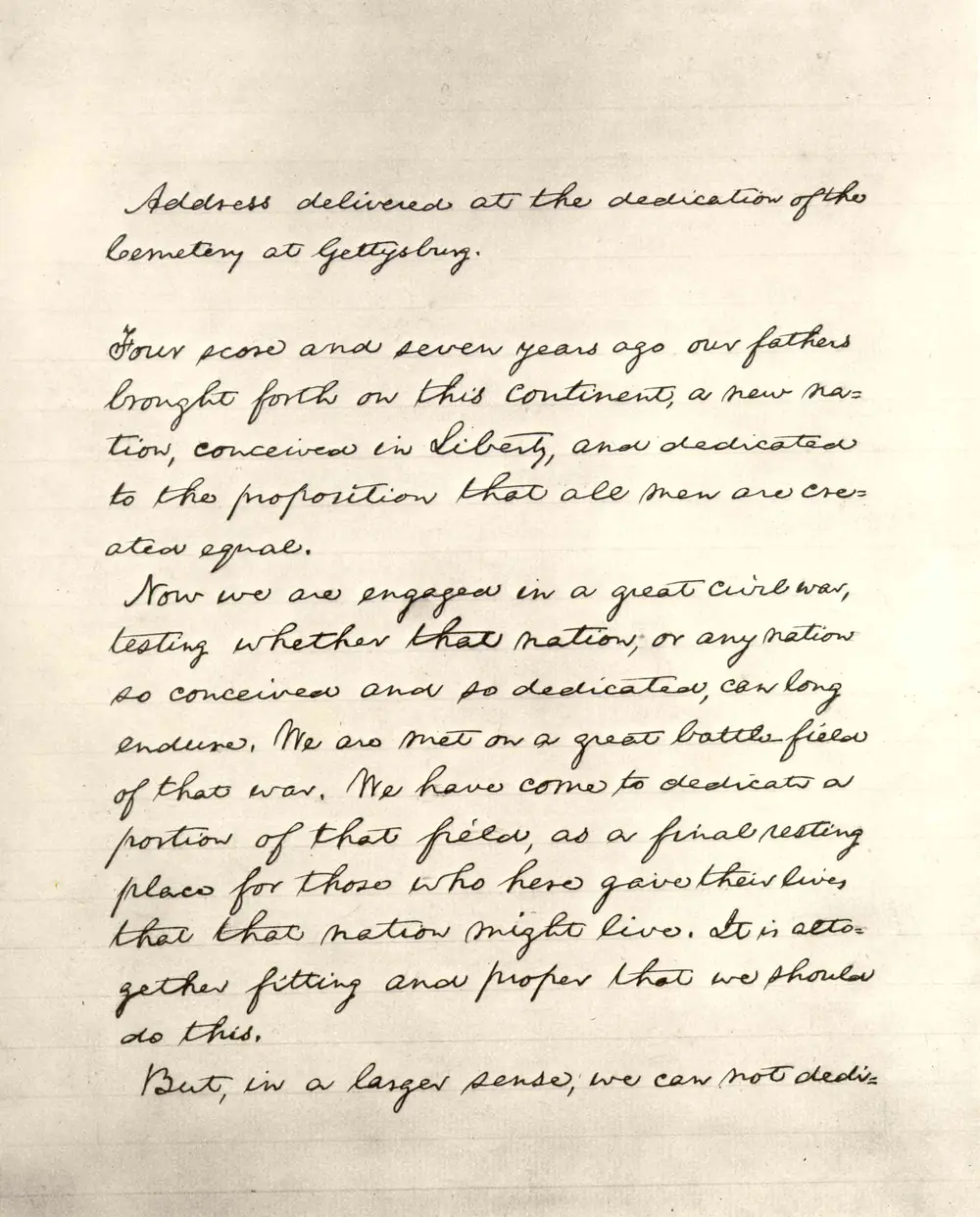
Extracted text
Unedited Vision output · 141 words · English
Unedited output for this file, mistakes included. Vision read “Cemetery” as “bemetery” and “score” as “scose”. PDF uploads get a searchable PDF like this one; image uploads get the text.
Try your own fileSecurity
Encrypted, private, and deleted on schedule
Bank statements, passports and contracts are sensitive. Here is exactly what happens to a file you upload.
- Your deviceHTTPS upload
- Private storageAES-256 encrypted
- OCRMachines only
- DeletedAfter 30 days
Encrypted in transit
Every upload and download travels over HTTPS (TLS). Our storage refuses unencrypted connections.
Encrypted at rest
Files and results are stored encrypted with AES-256 on AWS, with all public access blocked.
Private, expiring links
Nobody can browse to your files. Download links are private and expire within an hour.
Deleted automatically
Uploads and extracted text are permanently deleted after 30 days. Delete your account and data any time.
Never used for training
Your files are never used to train AI models, by us or by the cloud services that read them.
Payments by Stripe
Card details go straight to Stripe. FastOCR never sees or stores your card number.
Rather not upload at all?
The free Mac and Windows apps read documents with your computer's built-in OCR. OCR runs offline, and your files never leave your computer.
Full details in our privacy policy.
What you can do
Document OCR, searchable PDFs, bank statements and API
One upload, four kinds of output. Every option runs on the same OCR engine.
Image to text
Screenshots, phone photos, receipts and book pages. Free, with no account.
- No signup for single images
- Translate the result
- Copy or download in one click
Searchable PDF
Scanned PDFs keep their look and gain an invisible, selectable text layer.
- Multi-page PDFs up to 1 GB
- Searchable PDF/A or Word
- Upload several PDFs at once
Bank statement to Excel
Transactions land in a clean spreadsheet, with balances checked against the statement.
- Excel, CSV and JSON
- Opening and closing balance check
- First 50 statement pages free
REST API
Document OCR from your own code. The bank statement API is not open yet.
- Document OCR and searchable PDF
- Presigned uploads, no size bottleneck
- OpenAPI 3.0 spec
How it works
How OCR works in 3 steps
From a scanned document or image to clean, editable text.
- Step 1
Upload your document or image
Drag and drop your file into the uploader or click to select a PNG, JPG, WebP, BMP, or PDF document up to 1GB.
- Step 2
FastOCR reads every word
FastOCR automatically detects the script and language across 100+ languages, isolates text regions, and converts characters to digital text.
- Step 3
Copy, polish, or download
Copy the extracted text instantly, apply AI Polish to fix OCR typos and restore formatting, or download as a searchable PDF (PDF/A) or Word document.
Compare
How FastOCR compares to traditional tools
Speed, script support and bank statement handling, side by side.
| Tool / Platform | Avg. Speed | Language & RTL Scripts | Searchable PDF/A | Bank Statement Audit | AI Error Correction | Platform Access |
|---|---|---|---|---|---|---|
FastOCR | < 2s | Native Arabic, Urdu Nastaliq & 100+ languages | Dual-layer searchable PDF/A & DOCX | Automated 5-point balance tie-out & Excel export | Contextual AI error & diacritic correction | Instant web app + Developer REST API |
Tesseract 5.x | 3–5s / page | Basic language packs (Frequent ligature errors in Nastaliq) | Basic HOCR / PDF text layer | Raw text only (No table extraction or audit) | None (Raw OCR only) | Command-line tool only (Self-hosted) |
Google Drive OCR | 5–10s | Standard print (Often loses column & document layout) | Unformatted Google Doc text only | Unstructured plain text | None | Manual Drive upload only |
Adobe Acrobat | 15–30s | Standard print (Requires separate font packages for RTL) | Searchable PDF & Word export | Basic table copy (No balance reconciliation) | Standard font matching | Desktop application |
Compare features in detail for specific use cases.
For developers
Add OCR to your app with one REST API
Create a job, upload to a presigned URL, poll, download. Multi-page PDFs up to 1 GB, document OCR and searchable PDF on the same flow. The bank statement API is not open yet. Convert statements on the website.
# 1. Create document job with Bearer auth
curl -s -X POST https://api.fastocr.org/v1/documents \
  -H "Authorization: Bearer $FASTOCR_API_KEY" \
  -H "Idempotency-Key: $(uuidgen)" \
  -H "Content-Type: application/json" \
  -d '{"filename":"invoice.pdf","size_bytes":1048576}'

# 2. Upload file directly to returned presigned S3 URL
curl -s -X PUT "<upload_url>" -T invoice.pdf

# 3. Start OCR & download result
curl -s -X POST https://api.fastocr.org/v1/documents/<id>/start \
-H "Authorization: Bearer $FASTOCR_API_KEY"Bearer fok_live_...Free desktop apps for Mac and Windows
Free, offline, no account needed. The apps use your computer's built-in OCR, so they read fewer languages and are less accurate than FastOCR online.
Tools
Specialized document OCR tools
Pages tuned for one document type or output format. Same engine, same free tier.
By document
- Invoice OCR & ExtractionExtract invoice numbers, line items, totals, dates, and vendor details into structured data
- Receipt OCR & ScannerScan receipts and expense slips with automatic merchant, tax, and itemized total detection
- Handwriting to Text OCRAI recognition for handwritten notes, cursive manuscripts, and forms
- Math Equation to LaTeXConvert mathematical equations and formulas directly into clean LaTeX code
- PDF OCR for LLMs & AIExtract clean markdown and structured text for ChatGPT, Claude, and RAG pipelines
- Book & Archive OCRDigitize physical books, academic theses, and multi-page historical archives
By format
- Image to Word (DOCX)Convert JPG, PNG, and WebP images into fully editable Microsoft Word documents
- PDF to Word OCRTurn non-selectable scanned PDFs into editable DOCX files preserving layout
- Image to TextExtract raw text instantly from photos, graphics, and image scans
- PDF to Text OCRExtract plain, searchable text from multi-page scanned PDF documents
- Screenshot to TextCapture, crop, and copy text directly from desktop and mobile screen captures
- PDF to Markdown OCRExtract clean, LLM-ready markdown from complex PDFs for ChatGPT, Claude, and RAG
By language (60 guides)
- English OCREnglish
- Hindi OCRहिन्दी
- Urdu OCRاردو
- Arabic OCRالعربية
- Japanese OCR日本語
- Bengali OCRবাংলা
- Farsi OCRفارسی
- Spanish OCREspañol
- German OCRDeutsch
- French OCRFrançais
- Chinese OCR中文
- Russian OCRРусский
- Portuguese OCRPortuguês
All language pages
- Italian OCR
- Korean OCR
- Turkish OCR
- Vietnamese OCR
- Thai OCR
- Indonesian OCR
- Dutch OCR
- Polish OCR
- Swedish OCR
- Punjabi OCR
- Hebrew OCR
- Greek OCR
- Tamil OCR
- Sinhala OCR
- Filipino OCR
- Ukrainian OCR
- Malay OCR
- Marathi OCR
- Telugu OCR
- Gujarati OCR
- Kannada OCR
- Malayalam OCR
- Burmese OCR
- Khmer OCR
- Lao OCR
- Georgian OCR
- Armenian OCR
- Hungarian OCR
- Czech OCR
- Romanian OCR
- Danish OCR
- Norwegian OCR
- Finnish OCR
- Slovak OCR
- Croatian OCR
- Bulgarian OCR
- Sanskrit OCR
- Uzbek OCR
- Catalan OCR
- Pashto OCR
- Serbian OCR
- Welsh OCR
- Nepali OCR
- Slovenian OCR
- Afrikaans OCR
- Amharic OCR
- Estonian OCR
- OCR translation pairs →
FAQ
Frequently asked questions
Accuracy, languages, pricing and privacy. Anything else? Email support@fastocr.org.
How do I convert a scanned PDF to editable text for free?
Upload your scanned PDF to FastOCR, select your target export format, and our AI engine extracts all text within seconds. FastOCR includes a free tier to convert documents with no credit card required, producing clean plain text, Word documents (DOCX), or searchable PDFs with embedded text layers.
Is FastOCR really free to use?
Yes, single-image text extraction is 100% free with no account registration required. For multi-page PDF processing and searchable PDF generation, FastOCR provides a free tier upon Google sign-in. Additional volume can be purchased with pay-as-you-go packs or monthly plans with no long-term lock-in. See our pricing page for current options.
How do I extract tables and transactions from bank statements into Excel?
Upload a digital PDF statement from a US or UK bank account at fastocr.org/bank-statement. You get an Excel (XLSX) and a CSV file with dates, descriptions, money in, money out and balances, and the page tells you whether the statement reconciles. Scanned statements and photos are read with OCR and may need more review. Check dates and descriptions against your statement.
What file types and document sizes can I upload?
FastOCR supports image formats including JPG, PNG, WebP, GIF, and BMP up to 20MB, as well as multi-page PDF documents up to 1GB. Language and script orientations are detected automatically.
How accurate is FastOCR on Arabic, Urdu, Hindi, and non-Latin scripts?
FastOCR reads complex right-to-left (RTL) scripts including Arabic, Urdu, Farsi, and Hebrew, as well as Devanagari (Hindi) and CJK languages. Our specialized vision models handle ligatures, diacritics, and cursive baseline connections. Accuracy depends on scan quality, resolution, and the script, so check the result.
What is AI Polish and how does it fix OCR errors?
AI Polish is a contextual post-processing feature powered by LLMs that automatically fixes optical recognition errors, restores missing accents and diacritics, fixes punctuation, and corrects character substitution mistakes in degraded or handwritten scans.
Can FastOCR extract text from handwriting and low-resolution photos?
Yes. FastOCR reads clear handwriting, historical manuscripts, receipts, and mobile photo captures. For degraded or skewed images, built-in image normalization and AI Polish work together to help recover difficult words.
Does FastOCR offer a developer REST API for automated OCR?
Yes. FastOCR provides a high-speed asynchronous REST API for document OCR and searchable PDF creation. The bank statement API is not open yet, and statements are converted on the website. Every account receives free evaluation API credits with full OpenAPI 3.0 specs and quickstart cURL, Python, and Node.js examples.
Is my data private and secure on FastOCR?
All files are encrypted in transit with 256-bit TLS and at rest. Uploaded documents and extracted outputs are automatically deleted after 30 days. We never sell your data or use your private documents to train public AI models.
Can I translate the extracted text into another language?
Yes. After extracting text from a single image, you can translate the text into English, Spanish, French, German, Arabic, Chinese, Japanese, and 100+ other languages directly from the results interface. Translation and AI Polish work on single images, not PDFs.
FastOCR
Make every scan searchable.
Extract text from any document in seconds, in 100+ languages. Free for single images, no credit card.
4.9/5from 1,840+ ratings