Windows app
FastOCR for Windows: free offline OCR software
FastOCR for Windows is a free OCR app that turns scanned PDFs and images into searchable PDFs and plain text on your own PC. It uses the OCR built into Windows, works offline, and your files never leave this PC.
Your browser or Windows may warn you before the installer runs. Read the steps first.
Download for WindowsVersion 0.1.0 · 53.8 MB · October 14, 2026 · Windows 10 version 22H2 and Windows 11 · 64-bit (x64) · Free
The app
See FastOCR for Windows at work
Two screens: drop a document in, get the searchable PDF and the text out.
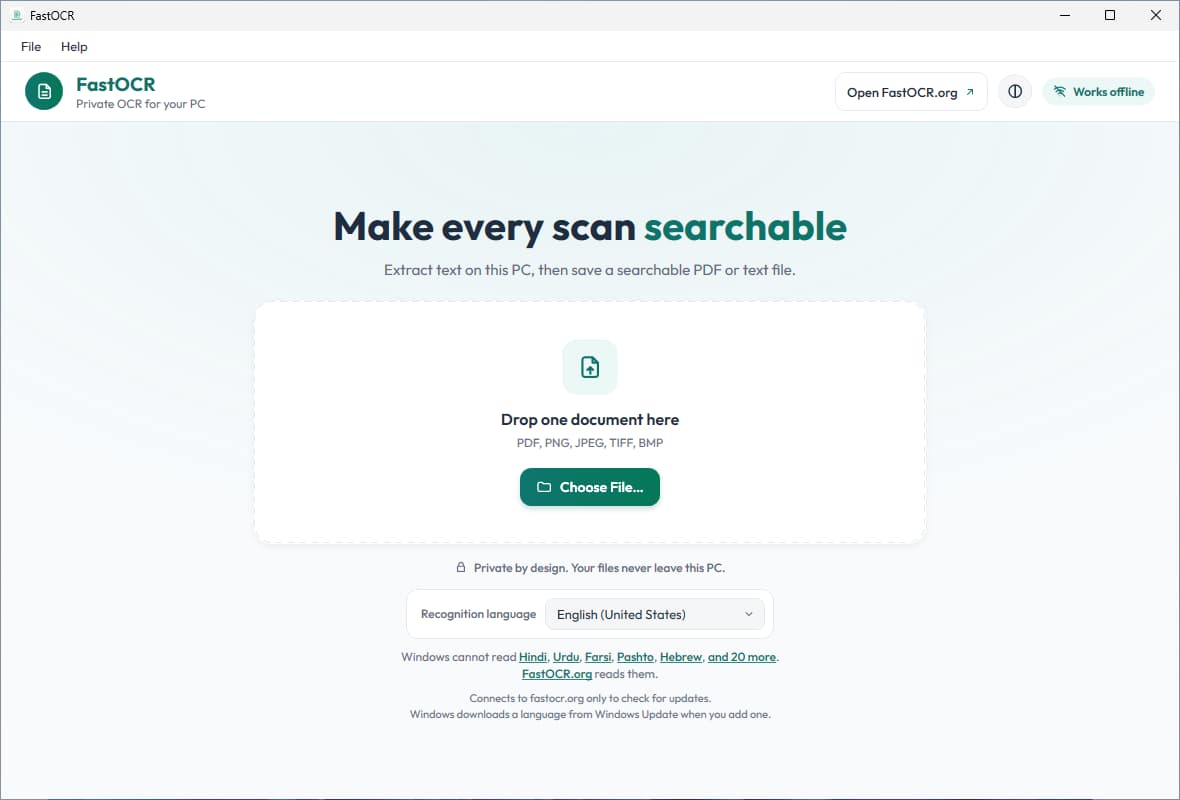
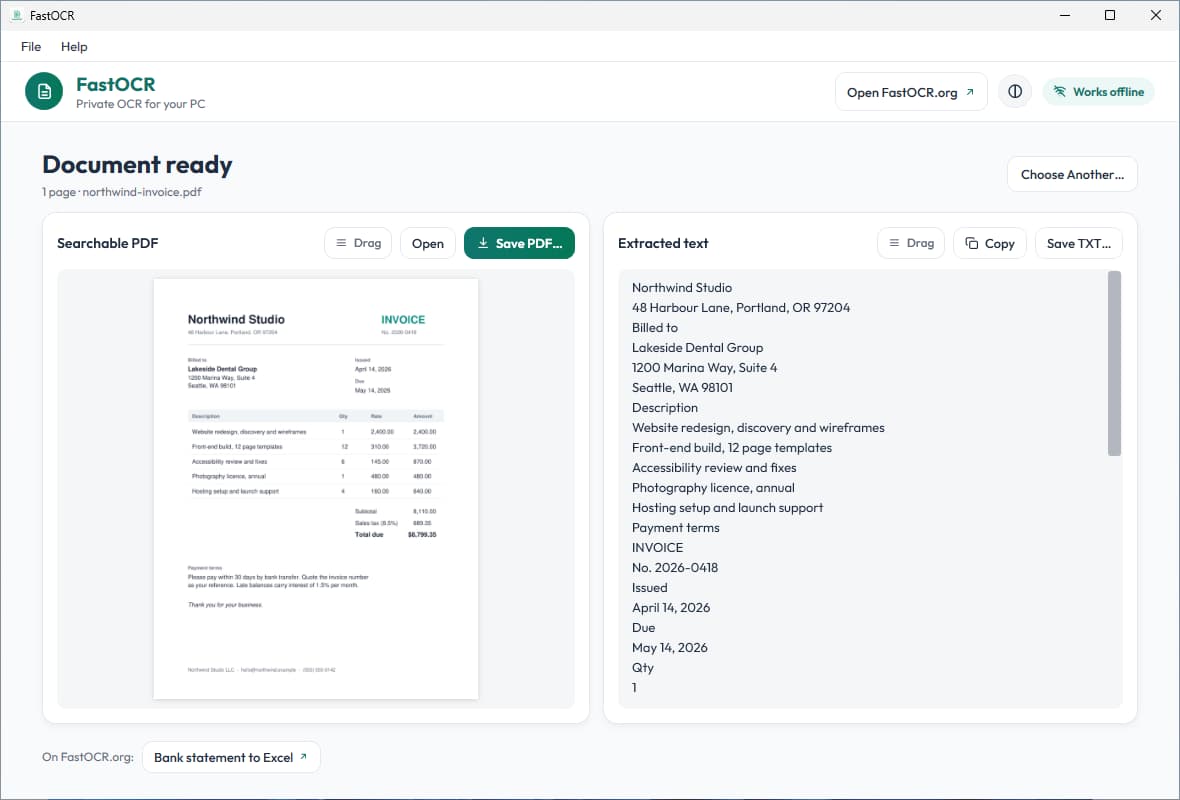
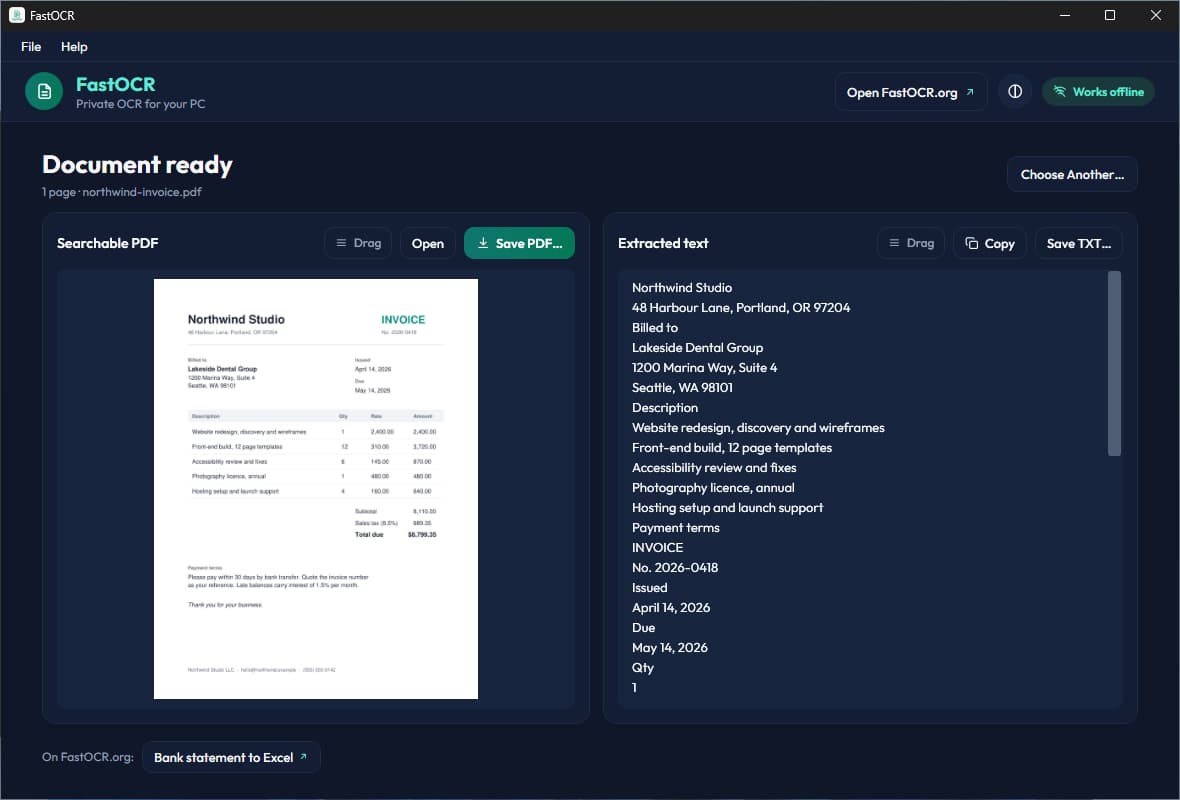
Drop a PDF or image on the window, or choose a file. Pick the language to read. The app does not detect it for you.
Real screenshots of FastOCR for Windows 0.1.0 reading a sample scanned invoice.
Install the beta
Your browser or Windows may warn you the first time
This beta installer is not signed yet, so your browser may stop to ask, and Windows SmartScreen may as well. Approve it once and it installs normally.
- Step 1
Download the installer. Microsoft Edge says the file isn't commonly downloaded. Open the ... menu next to the download and click Keep. In the box that asks you to make sure you trust the file, open the arrow beside Delete and click Keep anyway. Other browsers may show their own warning: keep the file.
- Step 2
Open the installer. If Windows shows Windows protected your PC, click More info.
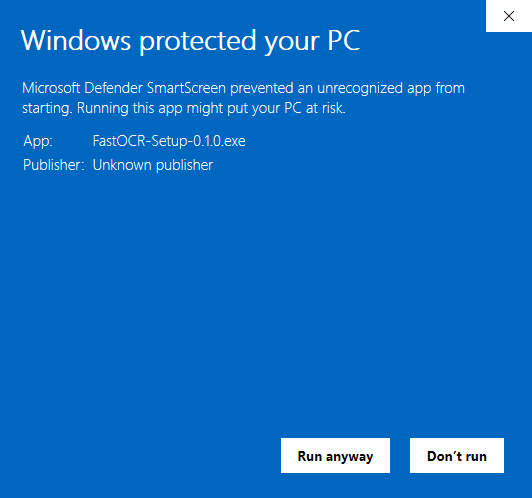
- Step 3If you saw that screen, click Run anyway. The installer opens.
Good to know
- If you kept the file in Edge, Windows may open the installer without showing the Windows protected your PC screen.
- Updates install from inside the app (Help, Check for Updates), so you do not download the installer again.
- PCs with Smart App Control turned on, and some company PCs, cannot run this beta.
- The SHA-256 below lets you check that your file is the one we published.
Problems? support@fastocr.org
What you get
Offline OCR that stays on your PC
Works offline
Documents are read on your PC with the OCR built into Windows. Your files never leave this PC. The app connects to fastocr.org only to check for app updates, and Windows downloads a language when you add one.
PDF and text out
Drop in a PDF or an image. Get a searchable PDF and plain text (TXT). Save them or copy all the text.
Windows 10 and 11
Windows 10 version 22H2 and Windows 11, 64-bit Intel or AMD. Not Windows 10 in S mode, not Windows on ARM. Free.
The languages Windows reads
The app reads the languages Windows has OCR packs for. You add a language from the app, and Windows downloads it.
Languages
What reads well, and what does not
The app reads the languages Windows has OCR packs for. 27 of FastOCR's languages read well.
The app uses Windows' built-in OCR, so it reads fewer languages and is less accurate than FastOCR online. For hard scans, handwriting, or other languages, use fastocr.org.
- Reads well
- English, Spanish, French, German, Italian, Portuguese, Russian, Japanese, Korean, Chinese (Simplified and Traditional), Arabic, Turkish, Dutch, Polish, Swedish, Greek, Hungarian, Czech, Romanian, Danish, Norwegian, Finnish, Slovak, Croatian, Bulgarian, Serbian, Slovenian
- Not supported
- Hindi, Urdu, Persian (Farsi), Hebrew, Thai, Vietnamese, Ukrainian, Bengali, Tamil, and other languages Windows has no OCR pack for
We measured these on one printed page per language. Real scans read less accurately.
Need a language the app cannot read? The web app at fastocr.org reads it. It uploads your document. Hindi, Urdu, Persian (Farsi), Hebrew, Thai.
Limits
What the Windows app does not do
- No translation, AI Polish or bank statement extraction. Those are web features.
- On real scans the built-in Windows OCR reads less accurately than clean printed pages. Check important text.
- One language per run. The app does not detect the language for you.
Check your download
SHA-256 of FastOCR-Setup-0.1.0.exe. Compare it with Get-FileHash FastOCR-Setup-0.1.0.exe in PowerShell.
3e6bd59723961ef724adedb0b4cb3c2c0653ea7f56c5eacb44b118dfa08832e0FAQ
FastOCR for Windows questions
Rather work in the browser? Use make a PDF searchable, PDF to text or image to text on the web. On a Mac? Get FastOCR for Mac.
Is FastOCR for Windows free?
Yes. FastOCR for Windows is free to download and use, and it does not need an account. This release is a beta. It installs for your user account and does not ask for an administrator. The web app at fastocr.org is separate, with its own free allowance and paid plans.
Does FastOCR for Windows work offline, and do my files leave my PC?
Yes. FastOCR for Windows works offline, including making a scanned PDF searchable, and your files never leave your PC. Documents are read on the PC with the OCR built into Windows, so nothing is uploaded. The app connects to fastocr.org only to check for app updates, and Windows downloads a language when you add one.
Which files and languages can FastOCR for Windows read?
It reads PDF, PNG, JPEG, BMP and TIFF files and gives you a searchable PDF and plain text. It reads the languages Windows has OCR packs for, and 27 of FastOCR's languages read well, including English, Spanish, French, German, Chinese, Japanese, Korean and Arabic. Hindi, Urdu, Persian (Farsi), Hebrew and Thai are not supported.
Why does Windows or my browser warn me about the installer?
The warning appears because this beta installer is not signed yet, so your browser may stop to ask and Windows SmartScreen may as well. Keep the file and choose Run anyway, following the steps on this page. PCs with Smart App Control turned on, and some company PCs, cannot run this beta.
How is FastOCR for Windows different from the FastOCR web app?
The Windows app reads documents on your PC and never uploads them. The web app at fastocr.org uploads each document to read it. The web app reads more languages and adds translation, AI Polish and bank statement extraction. The Windows app makes a searchable PDF and plain text, one language per run.
Which versions of Windows does FastOCR for Windows run on?
FastOCR for Windows runs on Windows 10 version 22H2 and Windows 11, on 64-bit Intel or AMD PCs. It does not run on Windows 10 in S mode or on Windows on ARM. The installer is 53.8 MB. It uses the OCR built into Windows, and you add recognition languages from inside the app.
FastOCR
Need more than text and a searchable PDF?
Translation, AI Polish, bank statement extraction, and the languages above are on the web.