Urdu OCR — Image to Text & PDF
مفت آن لائن اردو OCR — تصویر سے ٹیکسٹ نکالیں
تصاویر اور اسکین شدہ دستاویزات سے اردو متن نکالیں
- Nastaliq script support
- Right-to-left layout
- Diacritics recognition
Free image OCR. No account needed. PDFs use pages.
Open OCR for all languagesUrdu handwriting
Real scan. Unedited OCR.
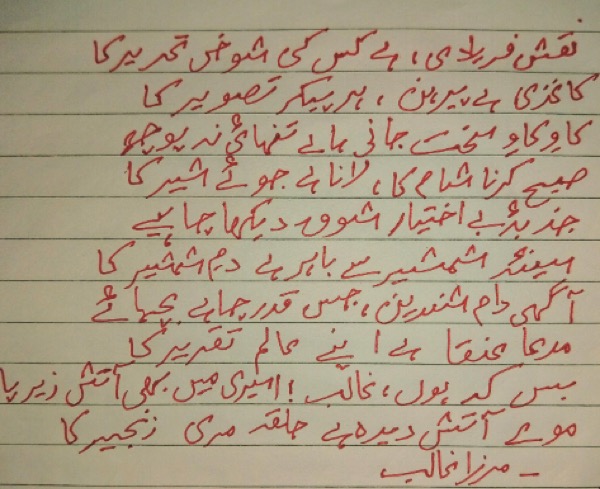
نقش فریادی ہے کس کی شوخی تحریر کا
کاغذی ہے پیرہن، ہر پیکر تصویر کا
کا وکا و سخت جانی جانے تنہائی نہ پوچھ
صبح کرنا شام کا، لانا ہے جوئے شیر کا
جذبہ بے اختیار شوق دیکھا چاہیے۔
میں شمشیر سے باہر ہے دم شمشیر کا
آگهی دام شورین، جس قدر چاہے بچہائے
مرعا عنقا ہے اپنے معالم تقریر کا
بس کہ ہوں، غالب! امیری میں بھی آتش زیرپا
مولے آتش دیدہ ہے حلقہ مری زنجیر کا
- مرزا غالب
Right-to-left text preserved
Urdu OCR converts images, scans and PDFs containing Urdu (اردو) text into editable, searchable digital text. FastOCR reads Urdu online: upload an image with no account, or a PDF with a free account, then copy the text or download a searchable PDF. Accuracy depends on scan quality, so check the result against your original.
Try it with your Urdu document
فائل یہاں ڈراپ کریں
PDF, PNG, JPG, WebP, BMP, HEIC
PDF زیادہ سے زیادہ 1 GB · تصاویر زیادہ سے زیادہ 20 MB
صاف تصویر کے لیے مشورے
- صفحہ ہموار سطح پر رکھیں۔
- یکساں روشنی رکھیں، سائے نہ ہوں۔
- چمک سے بچنے کے لیے فلیش بند کریں۔
- صفحے کو پورے فریم میں لائیں۔
What is Urdu OCR & Developer API?
Developer API docs →Urdu OCR is the automated process of converting scanned multi-page PDFs up to 1GB and documents into editable, searchable Urdu text while preserving right-to-left reading order, connected script, and diacritics. FastOCR reads printed text in this script and generates full-text searchable PDFs with selectable text overlays. For engineering teams building RAG pipelines, vector search databases, or automated document ingestion, FastOCR also provides a Urdu OCR REST API at api.fastocr.org with 50 free pages a month for every signed-in account. The API accepts PDF files up to 1 GiB, and PNG, JPG, JPEG, GIF, WebP and BMP images up to 20 MiB. An image counts as one page.
Nastaliq script support
Handles the flowing Nastaliq calligraphic style used in Urdu.
Right-to-left layout
Native RTL text handling with correct character joining.
Diacritics recognition
Reads Urdu diacritical marks (aerab) when present.
Mixed Urdu & English
Handles bidirectional documents with both scripts.
Searchable PDF output
Creates PDFs with invisible text layer preserving RTL layout.
Translate after extraction
Extract Urdu text then translate to English or any language.
اردو OCR کیوں ایک چیلنج ہے؟
- Recognizing Nastaliq calligraphic style where characters flow diagonally rather than on a horizontal baseline
- Right-to-left script with bidirectional text when Urdu is mixed with English or numbers
- Handling the extended Arabic character set unique to Urdu: ٹ, ڈ, ڑ, ں, ے, ھ
- Processing documents with dense Nastaliq ligatures that merge multiple characters into complex shapes
- Distinguishing dots and diacritics that differentiate similar Urdu letter forms
- Correctly interpreting Urdu text set in Naskh font versus traditional Nastaliq
پی ڈی ایف اور تصاویر سے اردو متن نکالنے کا طریقہ
- پر جائیں fastocr.org
- اپنی اردو تصویر یا پی ڈی ایف اپ لوڈ کریں۔ زبان کا پتہ خود بخود لگایا جائے گا۔
- پروسیسنگ کا انتظار کریں — تصاویر میں چند سیکنڈ لگتے ہیں، پی ڈی ایف ایک پروگریس بار دکھاتی ہے۔
- نتائج ڈاؤن لوڈ کریں: تلاش کے قابل پی ڈی ایف، اصل ٹیکسٹ فائل، یا ٹیکسٹ براہ راست کاپی کریں۔
اردو OCR کی درستگی کو بہتر بنانے کے لیے تجاویز
- Use Naskh-style Urdu fonts for source documents when possible — OCR tends to be more accurate than on Nastaliq
- Scan at 300+ DPI to preserve the dots and diacritics that distinguish Urdu characters
- For Nastaliq documents, use high-contrast scans to capture the diagonal character flow
- Verify the extended Urdu characters (ٹ, ڈ, ڑ, ں, ے) which are often confused with Arabic equivalents
- Separate multi-column Urdu layouts into single columns before processing
اردو OCR کے عام استعمال کے معاملات
- Digitizing Urdu madrasa books and Islamic educational texts
- Extracting text from Dars-e-Nizami texts and Na'at collections
- Converting madrasa textbooks to searchable digital format
- Digitizing Urdu legal documents, court orders, and government notifications
- Extracting text from Pakistani government forms, CNIC cards, and certificates
- Converting scanned Urdu newspapers, magazines, and literary publications
- Processing Urdu business correspondence and commercial invoices
- Archiving Urdu poetry collections, religious texts, and historical manuscripts
FastOCR vs Standard OCR Apps for Urdu
| Capability | FastOCR Dedicated Cloud AI | Standard Online OCR Tools |
|---|---|---|
| Urdu Script Recognition | ✅ Full native cloud recognition for Urdu (Nastaliq & Naskh cursive ligatures) | ❌ Most online tools do not support Urdu or Arabic at all |
| Right-to-Left (RTL) Layout Flow | ✅ Preserves proper bidirectional RTL reading order | ❌ Scrambles character order backwards (left-to-right) |
| Searchable PDF/A Output | ✅ Dual-layer searchable PDF with coordinate-aligned text overlay | Plain unformatted text dump only or unsupported |
| Instant Web Access | ✅ Zero software installation (runs in mobile & desktop browser) | Requires local CLI libraries or complex desktop setup |
اکثر پوچھے گئے سوالات
Can Urdu OCR recognize Nastaliq font?
Yes. FastOCR can recognize Urdu in Nastaliq font, though accuracy is generally higher on Naskh-style Urdu text due to the horizontal baseline.
How accurate is Urdu OCR?
FastOCR reads printed Urdu text in both Naskh and Nastaliq fonts, with Naskh generally easier. Handwritten Urdu is recognized less reliably than print.
Is Urdu OCR free?
Yes. Image OCR is free with no registration. PDF processing requires a free account — see fastocr.org/pricing for plan details.
Does it handle mixed Urdu and English text?
Yes. FastOCR handles bidirectional text, extracting both Urdu (RTL) and English (LTR) from the same document with correct ordering.
Why is Nastaliq harder for OCR than Naskh?
Nastaliq characters flow diagonally with varying baselines and dense ligatures, making character segmentation difficult. Naskh uses a horizontal baseline with clearly separated characters, which OCR engines handle much more reliably. For best results, use Naskh-style source documents.
How does FastOCR handle Urdu dot positioning?
Urdu letters are distinguished by dots (nuqta) placed above or below the base character — e.g., ب has one dot below, ت has two dots above, ث has three dots above. FastOCR's AI models are trained to detect these fine positional details at 300+ DPI, ensuring correct character recognition.
Dedicated Urdu Tools
PDF to Text
Convert and extract Urdu documents.
Image to Text
Convert and extract Urdu documents.
Handwriting OCR
Convert and extract Urdu documents.
Searchable PDF
Convert and extract Urdu documents.
Urdu to English Translation
Convert and extract Urdu documents.
English to Urdu Translation
Convert and extract Urdu documents.
All supported languages
Convert and extract Urdu documents.
Explore Specialized OCR Workflows
FastOCR provides dedicated AI text recognition engines optimized for complex document types and formats:
Free for images. No registration required.
Related Articles & Resources
Image to Text
Convert any image to editable text instantly
PDF to Text
Extract text from scanned and native PDFs
Urdu Nastaliq OCR Guide
In-depth guide to extracting text from Urdu Nastaliq books, poetry, and lithographs
OCR for Islamic Books
Digitize Urdu madrasa books, tafsir, and hadith literature
Urdu OCR Blog Guide
Detailed guide to Urdu text extraction techniques
Urdu PDF to Text
Extract Urdu text from scanned and native PDFs
Urdu Image to Text
Convert Urdu images and photos to editable text
Urdu Handwriting OCR
Convert handwritten Urdu notes and Nastaliq pages to text
Free Urdu OCR
Upload & Extract TextLast updated: July 24, 2026