Ukrainian OCR — Image to Text & PDF
Вилучення українського тексту з зображень та PDF-файлів
- Cyrillic Script support
- Apostrophe handling
- Searchable PDF generation
Free image OCR. No account needed. PDFs use pages.
Open OCR for all languagesShevchenko kobzar, 1840
Real scan. Unedited OCR.
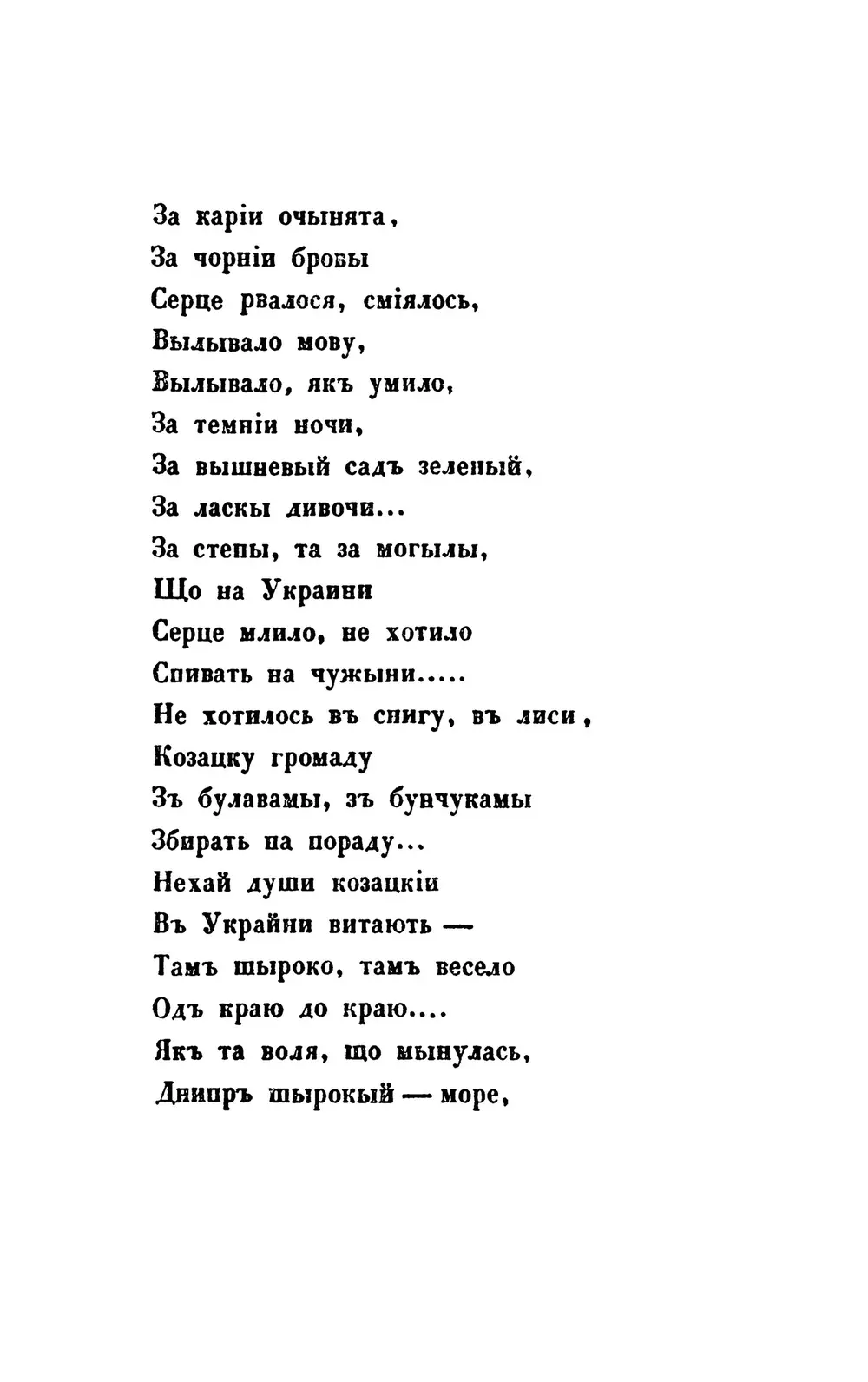
За каріи очынята,
За чорній бровы
Серце рвалося, сміялось,
Вымывало мову,
Вылывало, якъ умило,
За темній ночи,
За вышневый садъ зеленый,
За ласкы дивочи...
За степы, та за могылы,
Що на Украини
Серце млило, не хотило
Спивать на чужыни.....
Не хотилось въ снигу, въ лиси,
Козацку громаду
Зъ булавамы, зъ бунчукамы
Збирать па пораду...
Нехай души козацкій
Въ Украйни витають-
Тамъ шыроко, тамъ весело
Одъ краю до краю....
Якъ та воля, що мынулась,
Днипръ шырокый- море,
Original text order preserved
Ukrainian OCR converts images, scans and PDFs containing Ukrainian (Українська) text into editable, searchable digital text. FastOCR reads Ukrainian online: upload an image with no account, or a PDF with a free account, then copy the text or download a searchable PDF. Accuracy depends on scan quality, so check the result against your original.
Try it with your Ukrainian document
Drop your file here
PDF, PNG, JPG, WebP, BMP, HEIC
PDF up to 1 GB · images up to 20 MB
Tips for a clear photo
- Lay the page flat.
- Use even light, with no shadows.
- Turn off the flash to avoid glare.
- Fill the frame with the page.
What is Ukrainian OCR & Developer API?
Developer API docs →Ukrainian OCR is the automated process of converting scanned multi-page PDFs up to 1GB and documents into editable, searchable Ukrainian text while preserving accents, complex ligatures, and native character shapes. FastOCR reads printed text in this script and generates full-text searchable PDFs with selectable text overlays. For engineering teams building RAG pipelines, vector search databases, or automated document ingestion, FastOCR also provides a Ukrainian OCR REST API at api.fastocr.org with 50 free pages a month for every signed-in account. The API accepts PDF files up to 1 GiB, and PNG, JPG, JPEG, GIF, WebP and BMP images up to 20 MiB. An image counts as one page.
Cyrillic Script support
Full recognition of the 33 letters of the Ukrainian alphabet.
Apostrophe handling
Correctly recognizes apostrophes without splitting Ukrainian words.
Searchable PDF generation
Create searchable PDFs with selectable Ukrainian text layers.
Translate after extraction
Translate extracted Ukrainian text to English or 100+ other languages.
Why Ukrainian OCR Is Challenging
- Distinguishing similar Cyrillic letters (e.g. і, ї, є) in degraded scans
- Correctly rendering the apostrophe without inserting extra spaces
- Processing documents with mixed Ukrainian and Russian or English text
- Handling ancient fonts and old prints in historical archives.
How to Extract Ukrainian Text from a PDF & Images
- Go to fastocr.org
- Upload your Ukrainian image or PDF. Language is detected automatically.
- Wait for processing — images take seconds, PDFs show a progress bar.
- Download results: searchable PDF, raw text file, or copy text directly.
Tips for Better Ukrainian OCR Accuracy
- Use 300 DPI scans to preserve fine Cyrillic diacritics like the dots on ї
- Avoid skewed pages to maintain correct text line detection
- Check spelling of Cyrillic characters that look like Latin letters
Common Use Cases for Ukrainian OCR
- Digitizing Ukrainian legal documents, records, and certificates
- Converting scanned Ukrainian literature, textbooks, and academic publications
- Processing invoices and administrative files
- Digitizing student research papers and thesis documents for university archives.
FastOCR vs Standard OCR Apps for Ukrainian
| Capability | FastOCR Dedicated Cloud AI | Standard Online OCR Tools |
|---|---|---|
| Ukrainian Script Recognition | ✅ Full native cloud recognition for Ukrainian (complex alphabets and diacritics) | Limited character sets or unhandled accents |
| Multi-Column & Table Layouts | ✅ Preserves proper paragraph and table alignment | Merges unrelated columns together |
| Searchable PDF/A Output | ✅ Dual-layer searchable PDF with coordinate-aligned text overlay | Plain unformatted text dump only or unsupported |
| Instant Web Access | ✅ Zero software installation (runs in mobile & desktop browser) | Requires local CLI libraries or complex desktop setup |
Frequently Asked Questions
How accurate is Ukrainian OCR?
FastOCR reads clean printed Ukrainian text using advanced Cyrillic OCR models.
Does it support the letter Ґ?
Yes, our model fully supports the letter Ґ (Ge) alongside standard Cyrillic characters.
Is Ukrainian OCR free?
Yes. Image OCR is free: try it without an account, and sign in for unlimited free image OCR. PDF processing requires a free account — see fastocr.org/pricing for plan details.
Dedicated Ukrainian Tools
PDF to Text
Convert and extract Ukrainian documents.
Image to Text
Convert and extract Ukrainian documents.
Handwriting OCR
Convert and extract Ukrainian documents.
Searchable PDF
Convert and extract Ukrainian documents.
Ukrainian to English Translation
Convert and extract Ukrainian documents.
English to Ukrainian Translation
Convert and extract Ukrainian documents.
All supported languages
Convert and extract Ukrainian documents.
Explore Specialized OCR Workflows
FastOCR provides dedicated AI text recognition engines optimized for complex document types and formats:
Free for images. No registration required.
Related Articles & Resources
Image to Text
Convert any image to editable text instantly
Russian OCR
OCR for Russian Cyrillic documents
Polish OCR
OCR for Polish text
PDF to Text
Extract text from PDFs online
What is OCR?
Learn how optical character recognition technology works.
How Accurate Is OCR?
Discover the accuracy limits of modern OCR technology.
Ukrainian OCR Guide
Read the complete guide to Ukrainian OCR and text extraction.
Free Ukrainian OCR
Upload & Extract TextLast updated: July 24, 2026