Norwegian OCR — Image to Text & PDF
Trekk ut norsk tekst fra bilder og skannede dokumenter
- Bokmål & Nynorsk
- Nordic character support
- Ø distinction
Free image OCR. No account needed. PDFs use pages.
Open OCR for all languagesGrunnloven, 1814
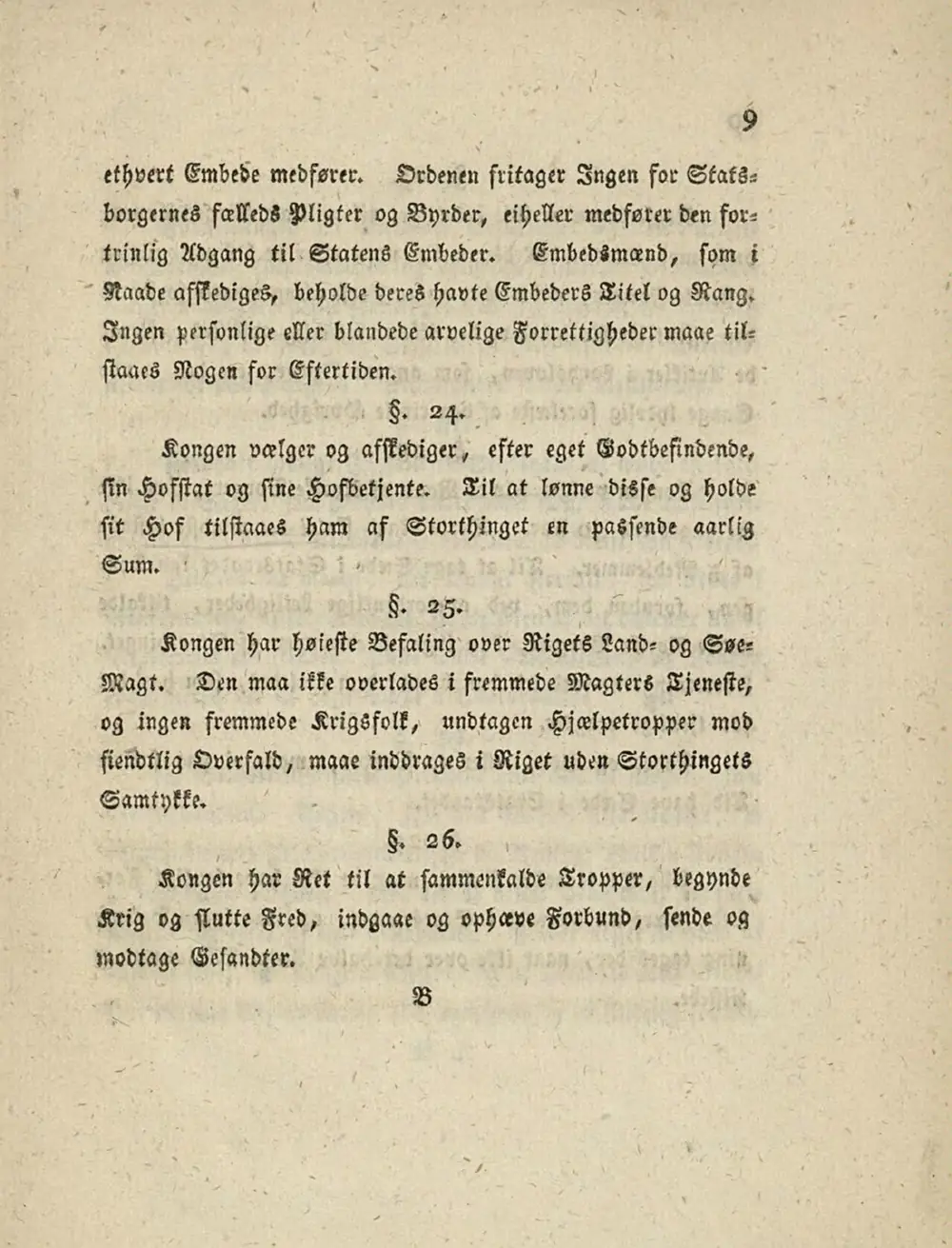
Real scan. Unedited OCR.
9
ethvert Embede medfører. Ordenen fritager Ingen for Stats.
borgernes fælleds Pligter og Byrder, eiheller medfører den for-
trinlig Adgang til Statens Embeder. Embedsmænd, som i
Naade afskediges, beholde deres havte Embeders Titel og Rang.
Ingen personlige eller blandede arvelige Forrettigheder maae til-
staaes Nogen for Eftertiden.
dede§. 24
Kongen vælger og afskediger, efter eget Godtbefindende,
fin Hofstat og sine Hofbetjente. Til at lønne disse og holde
sit hof tilstaaes ham af Storthinget en passende aarlig
Sum. 81011
tal§. 25-
Kongen har høieste Befaling over Rigets Land- og Søe-
Magt. Den maa ikke overlades i fremmede Magters Tjeneste,
og ingen fremmede Krigsfolk, undtagen Hjælpetropper mod
fiendtlig Overfald, maae inddrages i Riget uden Stortingets
Samtykke.
§. 26.
Kongen har Ret til at sammenkalde Tropper, begynde
Krig og slutte Fred, indgaae og ophæve Forbund, sende og
modtage Gesandter.
28
Original text order preserved
Norwegian OCR converts images, scans and PDFs containing Norwegian (Norsk) text into editable, searchable digital text. FastOCR reads Norwegian online: upload an image with no account, or a PDF with a free account, then copy the text or download a searchable PDF. Accuracy depends on scan quality, so check the result against your original.
Try it with your Norwegian document
Drop your file here
PDF, PNG, JPG, WebP, BMP, HEIC
PDF up to 1 GB · images up to 20 MB
Tips for a clear photo
- Lay the page flat.
- Use even light, with no shadows.
- Turn off the flash to avoid glare.
- Fill the frame with the page.
What is Norwegian OCR & Developer API?
Developer API docs →Norwegian OCR is the automated process of converting scanned multi-page PDFs up to 1GB and documents into editable, searchable Norwegian text while preserving accents, complex ligatures, and native character shapes. FastOCR reads printed text in this script and generates full-text searchable PDFs with selectable text overlays. For engineering teams building RAG pipelines, vector search databases, or automated document ingestion, FastOCR also provides a Norwegian OCR REST API at api.fastocr.org with 50 free pages a month for every signed-in account. The API accepts PDF files up to 1 GiB, and PNG, JPG, JPEG, GIF, WebP and BMP images up to 20 MiB. An image counts as one page.
Bokmål & Nynorsk
Handles both official written Norwegian standards with equal accuracy.
Nordic character support
Correctly recognizes æ, ø, å as distinct Norwegian letters.
Ø distinction
Distinguishes ø from o and ö — Norwegian uses ø unlike Swedish/German.
Compound words
Keeps long Norwegian compound nouns intact without splitting.
Searchable PDF output
Creates PDFs with invisible text layer for full-text search.
Translate after extraction
Extract Norwegian text then translate to English or any language.
Why Norwegian OCR Is Challenging
- Supporting two official written standards — Bokmål (majority) and Nynorsk (minority) — with differing spelling conventions
- Recognizing æ, ø, å which are separate letters at the end of the Norwegian alphabet (not accented variants)
- Distinguishing Norwegian from Danish text — the two languages share many words but differ in Norwegian-specific forms
- Processing long compound nouns that combine multiple words (e.g., menneskerettighetsdomstol)
- Handling the silent letters and unusual consonant clusters in Norwegian spelling (e.g., hval, hjerte)
How to Extract Norwegian Text from a PDF & Images
- Go to fastocr.org
- Upload your Norwegian image or PDF. Language is detected automatically.
- Wait for processing — images take seconds, PDFs show a progress bar.
- Download results: searchable PDF, raw text file, or copy text directly.
Tips for Better Norwegian OCR Accuracy
- Scan at 300 DPI to preserve the fine stroke details of æ and the slash through ø
- Verify that ø is not converted to ö or plain o — Norwegian uses ø exclusively (unlike Swedish)
- Check that compound words are intact — words like trygdeoppgjørsloven should stay as one unit
- For Nynorsk documents, watch for spelling differences like ikkje vs ikke and regjering vs styresmakt
- Ensure æ is preserved as a single character and not split into "ae" by the OCR engine
Common Use Cases for Norwegian OCR
- Digitizing Norwegian legal documents, contracts, and court rulings
- Extracting text from Norwegian government forms (Skattetaten, NAV, Brønnøysundregistrene)
- Converting scanned Norwegian academic papers and university publications
- Processing Norwegian business invoices and petroleum sector documentation
- Archiving historical Norwegian documents and genealogical church records (kirkebøker)
FastOCR vs Standard OCR Apps for Norwegian
| Capability | FastOCR Dedicated Cloud AI | Standard Online OCR Tools |
|---|---|---|
| Norwegian Script Recognition | ✅ Full native cloud recognition for Norwegian (complex alphabets and diacritics) | Limited character sets or unhandled accents |
| Multi-Column & Table Layouts | ✅ Preserves proper paragraph and table alignment | Merges unrelated columns together |
| Searchable PDF/A Output | ✅ Dual-layer searchable PDF with coordinate-aligned text overlay | Plain unformatted text dump only or unsupported |
| Instant Web Access | ✅ Zero software installation (runs in mobile & desktop browser) | Requires local CLI libraries or complex desktop setup |
Frequently Asked Questions
Does Norwegian OCR support both Bokmål and Nynorsk?
Yes. FastOCR handles both written Norwegian standards. Spelling differences like Bokmål "ikke" vs Nynorsk "ikkje" are preserved as they appear in the source document.
How does Norwegian OCR differ from Danish OCR?
Both use æ/ø/å, but Norwegian spelling conventions differ. FastOCR auto-detects the language and applies the appropriate model. Norwegian uses ø (not ö) and has distinct spelling patterns from Danish.
Can it handle Norwegian documents from before the 1917 spelling reform?
The OCR extracts text as-is, preserving historical spellings. Pre-1917 documents may use older forms like "nu" instead of modern "nå" — these are preserved in the output.
Is Norwegian OCR free?
Image OCR is free with no registration. PDF processing requires a free account — see fastocr.org/pricing for plan details.
Dedicated Norwegian Tools
Explore Specialized OCR Workflows
FastOCR provides dedicated AI text recognition engines optimized for complex document types and formats:
Free for images. No registration required.
Related Articles & Resources
Norwegian OCR Guide
Read the complete guide to Norwegian OCR and text extraction
Swedish OCR
OCR for Swedish — another Scandinavian language
Danish OCR
OCR for Danish — shares æ, ø, å with Norwegian
German OCR
OCR for German — another Germanic language
Image to Text
Convert any image to editable text instantly
PDF to Text
Extract text from scanned and native PDFs
What is OCR?
Learn how optical character recognition technology works.
How Accurate Is OCR?
Discover the accuracy limits of modern OCR technology.
Free Norwegian OCR
Upload & Extract TextLast updated: July 24, 2026