Image to Markdown Converter — JPG & PNG OCR
Turn a JPG, JPEG, PNG or phone photo into a Markdown (.md) file: the same text as the .txt download, in the same order, as paragraphs. Free image OCR, no signup needed.
Drop your file here
PDF, PNG, JPG, WebP, BMP, HEIC
PDF up to 1 GB · images up to 20 MB
Tips for a clear photo
- Lay the page flat.
- Use even light, with no shadows.
- Turn off the flash to avoid glare.
- Fill the frame with the page.
A real scan and its Markdown
This is a real typewritten letter. The Markdown beside it is the file FastOCR writes for it, shown as raw text. The lines of each paragraph are joined, and nothing else is added: the page number and the “SECRET” marking stay as their own paragraphs. It is the complete file for this one page.
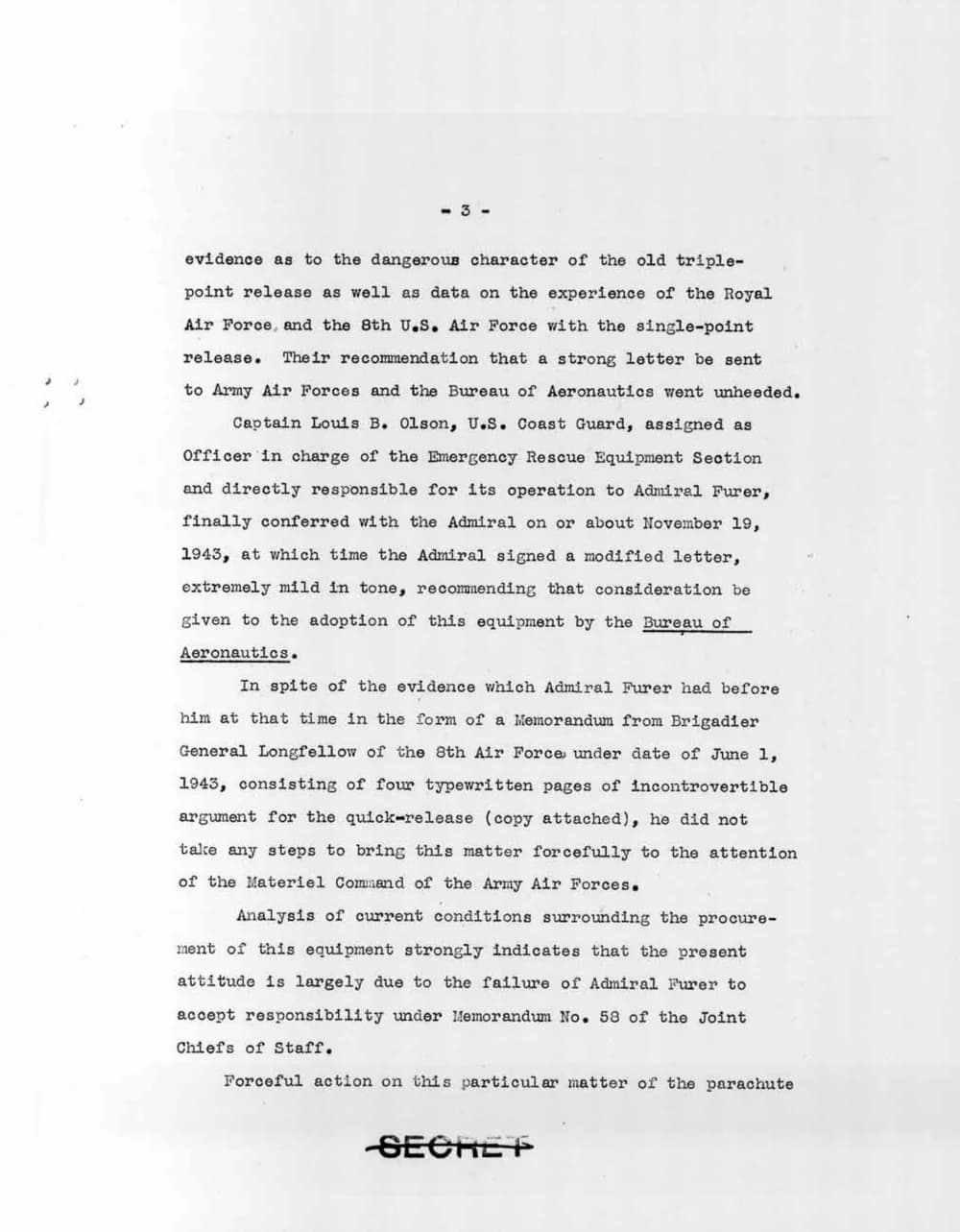
-3-

evidence as to the dangerous character of the old triple-point release as well as data on the experience of the Royal Air Force, and the 8th U.S. Air Force with the single-point release. Their recommendation that a strong letter be sent to Army Air Forces and the Bureau of Aeronautics went unheeded.

Captain Louis B. Olson, U.S. Coast Guard, assigned as Officer in charge of the Emergency Rescue Equipment Section and directly responsible for its operation to Admiral Furer, finally conferred with the Admiral on or about November 19, 1943, at which time the Admiral signed a modified letter, extremely mild in tone, recommending that consideration be given to the adoption of this equipment by the Bureau of Aeronautics.

In spite of the evidence which Admiral Furer had before him at that time in the form of a Memorandum from Brigadier General Longfellow of the 8th Air Force under date of June 1, 1943, consisting of four typewritten pages of incontrovertible argument for the quick-release (copy attached), he did not take any steps to bring this matter forcefully to the attention of the Materiel Command of the Army Air Forces.

Analysis of current conditions surrounding the procure-ment of this equipment strongly indicates that the present attitude is largely due to the failure of Admiral Furer to accept responsibility under Memorandum No. 58 of the Joint Chiefs of Staff.

Forceful action on this particular matter of the parachute

SECRET
How to convert an image to Markdown
- Upload a photo, scan or screenshot. The language is detected automatically.
- Wait a few seconds. FastOCR reads the text. Check names and numbers against the original.
- Download Markdown. Open the .md file in any editor, or paste it into ChatGPT, Claude or a notes app.
What the Markdown file contains
- The same words as the .txt download, in the same order.
- A page that FastOCR can reflow becomes paragraphs. A page with a table, form or other line-by-line layout keeps every line, as one block with line breaks.
- Characters that Markdown would read as formatting are backslash-escaped, so the text shows as written.
- No headings, lists or tables are added, and page headers and footers are not removed.
- Pictures, photos, diagrams and charts are not copied into the Markdown. Text recognized inside them stays as text.
- A single image has no page markers.
AI text recognition
AI OCR reads printed text and neat handwriting from photos, scans and screenshots.
Markdown or plain text
Download the result as a Markdown (.md) file, plain text or a Word file, or copy the text directly.
RTL preserved
Arabic, Urdu, and Farsi text direction is maintained correctly in the output.
JPG, PNG and phone photos
JPG, JPEG, PNG, WebP, GIF, BMP and HEIC photos. 100+ text languages are detected automatically.
Encrypted & auto-deleted
Files are encrypted at rest and permanently deleted after 30 days.
Fast processing
Most single images finish within seconds.
Frequently asked questions
How does Image to Markdown conversion work?
Upload a JPG, PNG or WebP image. FastOCR reads the text with AI-powered OCR and shows it on the results page. From there you can copy it or download it as a Markdown (.md) file.
What is in the Markdown file?
The same words as the plain-text download, in the same order. A page that FastOCR can reflow gets paragraphs. A page with a table, form or other line-by-line layout keeps every line as one block, so nothing runs together. Characters that Markdown would read as formatting are backslash-escaped, so the text shows as written. A single image has no page markers.
Does it detect headings, tables or lists?
No. The Markdown has paragraphs only. It does not add headings, lists, tables or emphasis, and it does not remove headers or footers. A photo of a table gives you its words, one line each, so expect to rebuild the table yourself.
Are pictures, diagrams and charts included?
No. Photos, diagrams and charts in your image are not copied into the Markdown. Text that FastOCR recognizes inside them stays as ordinary text, but what they show is not kept. This is a text export, not a layout-faithful converter.
Is JPG to Markdown conversion free?
Image OCR and Markdown downloads are free. Try a JPG, JPEG or PNG image without signing up, or sign in for unlimited free image OCR. PDF uploads require a free account and use a separate page allowance. See pricing for current limits.
Does it work with Arabic or Urdu images?
Yes. FastOCR supports 100+ languages including Arabic, Urdu, Farsi, and Hebrew. Always read the result once, as cursive scripts and low-quality photos can contain mistakes.
What image formats and sizes can I upload?
JPG, PNG, WebP, GIF and BMP images. See the pricing page for current file size limits for each plan.
Can I convert a PDF to Markdown instead?
Yes. Use the PDF to Markdown converter for scanned or digital PDFs. Pages are separated by page comments in the Markdown file.
Are my images kept private?
Files are encrypted at rest and permanently deleted after 30 days.
Only need plain text? Try Image to Text. Have a PDF instead? Use PDF to Markdown. Feeding an AI model? See PDF OCR for LLMs.