German OCR — Image to Text & PDF
Extrahieren Sie deutschen Text aus Bildern und gescannten Dokumenten
- Umlaut recognition
- Compound word handling
- Fraktur & blackletter
Free image OCR. No account needed. PDFs use pages.
Zur Elektrodynamik bewegter Körper, 1905
Real scan. Unedited OCR.
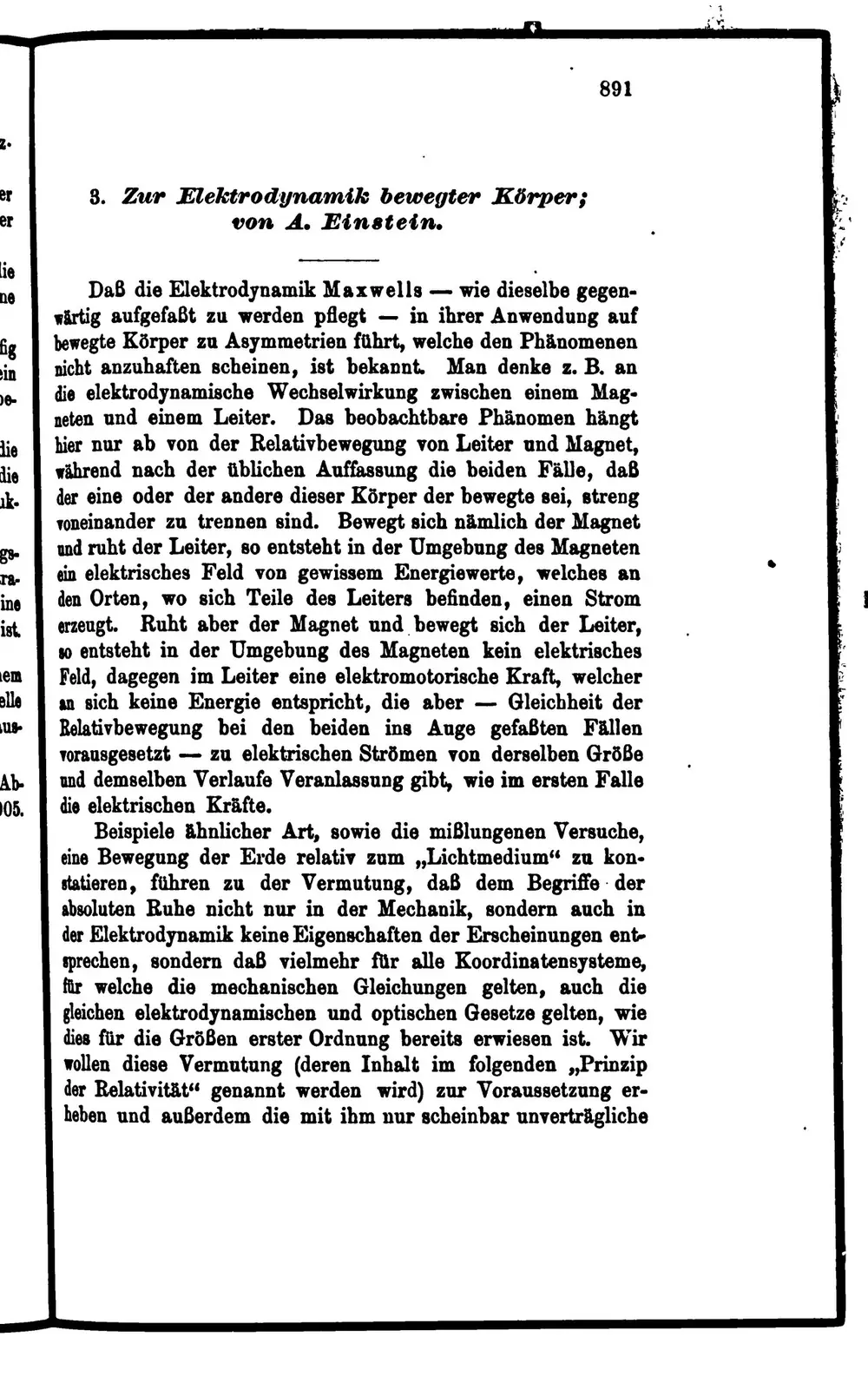
891
2.
er 3. Zur Elektrodynamik bewegter Körper;
er von A. Einstein.
Lie
ne Daß die Elektrodynamik Maxwells- I wie dieselbe gegen-
wärtig aufgefaßt zu werden pflegt- in ihrer Anwendung auf
fig bewegte Körper zu Asymmetrien führt, welche den Phänomenen
ein nicht anzuhaften scheinen, ist bekannt. Man denke z. B. an
De- die elektrodynamische Wechselwirkung zwischen einem Mag-
neten und einem Leiter. Das beobachtbare Phänomen hängt
Hie hier nur ab von der Relativbewegung von Leiter und Magnet,
die während nach der üblichen Auffassung die beiden Fälle, daß
uk. der eine oder der andere dieser Körper der bewegte sei, streng
voneinander zu trennen sind. Bewegt sich nämlich der Magnet
gg und ruht der Leiter, so entsteht in der Umgebung des Magneten
T8- ein elektrisches Feld von gewissem Energiewerte, welches an
ine den Orten, wo sich Teile des Leiters befinden, einen Strom
ist. erzeugt. Ruht aber der Magnet und bewegt sich der Leiter,
so entsteht in der Umgebung des Magneten kein elektrisches
em Feld, dagegen im Leiter eine elektromotorische Kraft, welcher
elle an sich keine Energie entspricht, die aber- Gleichheit der
18- Relativbewegung bei den beiden ins Auge gefaßten Fällen
vorausgesetzt- zu elektrischen Strömen von derselben Größe
Ab und demselben Verlaufe Veranlassung gibt, wie im ersten Falle
05. die elektrischen Kräfte.
Beispiele ähnlicher Art, sowie die mißlungenen Versuche,
eine Bewegung der Erde relativ zum„Lichtmedium“ zu kon-
statieren, führen zu der Vermutung, daß dem Begriffe der
absoluten Ruhe nicht nur in der Mechanik, sondern auch in
der Elektrodynamik keine Eigenschaften der Erscheinungen ent-
sprechen, sondern daß vielmehr für alle Koordinatensysteme,
für welche die mechanischen Gleichungen gelten, auch die
gleichen elektrodynamischen und optischen Gesetze gelten, wie
dies für die Größen erster Ordnung bereits erwiesen ist. Wir
wollen diese Vermutung(deren Inhalt im folgenden„Prinzip
der Relativität“ genannt werden wird) zur Voraussetzung er-
heben und außerdem die mit ihm nur scheinbar unverträgliche
Original text order preserved
German OCR converts images, scans and PDFs containing German (Deutsch) text into editable, searchable digital text. FastOCR reads German online: upload an image with no account, or a PDF with a free account, then copy the text or download a searchable PDF. Accuracy depends on scan quality, so check the result against your original.
Try it with your German document
Drop your file here
PDF, PNG, JPG, WebP, BMP, HEIC
PDF up to 1 GB · images up to 20 MB
Tips for a clear photo
- Lay the page flat.
- Use even light, with no shadows.
- Turn off the flash to avoid glare.
- Fill the frame with the page.
What is German OCR & Developer API?
Developer API docs →German OCR is the automated process of converting scanned multi-page PDFs up to 1GB and documents into editable, searchable German text while preserving accents, complex ligatures, and native character shapes. FastOCR reads printed text in this script and generates full-text searchable PDFs with selectable text overlays. For engineering teams building RAG pipelines, vector search databases, or automated document ingestion, FastOCR also provides a German OCR REST API at api.fastocr.org with 50 free pages a month for every signed-in account. The API accepts PDF files up to 1 GiB, and PNG, JPG, JPEG, GIF, WebP and BMP images up to 20 MiB. An image counts as one page.
Umlaut recognition
Correctly handles ä, ö, ü and the ß (Eszett) character.
Compound word handling
Recognizes long German compound words without splitting them.
Fraktur & blackletter
Reads historical German documents in traditional typefaces.
Formal documents
Processes German contracts, invoices, and official forms.
Searchable PDF output
Creates PDFs with invisible text layer for full-text search.
Translate after extraction
Extract German text then translate to any language.
Why German OCR Is Challenging
- Recognizing umlauts (ä, ö, ü) and Eszett (ß) which are critical for correct German spelling
- Handling extremely long compound words like Rechtsschutzversicherungsgesellschaften without splitting
- Processing Fraktur and blackletter typefaces found in historical German documents
- Distinguishing between ß and B or ss in different German orthographic conventions
- Correctly capitalizing all nouns as required by German grammar rules
How to Extract German Text from a PDF & Images
- Go to fastocr.org
- Upload your German image or PDF. Language is detected automatically.
- Wait for processing — images take seconds, PDFs show a progress bar.
- Download results: searchable PDF, raw text file, or copy text directly.
Tips for Better German OCR Accuracy
- Verify umlauts (ä, ö, ü) and ß after OCR — substitution with ae, oe, ue, ss changes meaning
- For Fraktur/blackletter documents, use specialized historical OCR preprocessing
- Check that compound words are kept intact and not incorrectly split by the OCR engine
- Scan at 300 DPI or higher to preserve the dots above umlauts in small font sizes
- Review noun capitalization — OCR may lowercase German nouns that should be capitalized
Common Use Cases for German OCR
- Digitizing German legal contracts, court rulings, and regulatory filings
- Extracting text from German engineering specifications and technical manuals
- Converting scanned German academic dissertations and scientific papers
- Processing German-language invoices, tax documents, and financial statements
- Archiving historical German documents printed in Fraktur typeface
FastOCR vs Standard OCR Apps for German
| Capability | FastOCR Dedicated Cloud AI | Standard Online OCR Tools |
|---|---|---|
| German Script Recognition | ✅ Full native cloud recognition for German (complex alphabets and diacritics) | Limited character sets or unhandled accents |
| Multi-Column & Table Layouts | ✅ Preserves proper paragraph and table alignment | Merges unrelated columns together |
| Searchable PDF/A Output | ✅ Dual-layer searchable PDF with coordinate-aligned text overlay | Plain unformatted text dump only or unsupported |
| Instant Web Access | ✅ Zero software installation (runs in mobile & desktop browser) | Requires local CLI libraries or complex desktop setup |
Frequently Asked Questions
Does German OCR handle umlauts and Eszett correctly?
Yes. FastOCR accurately recognizes ä, ö, ü, and ß. It does not substitute them with ae, oe, ue, or ss.
Can it read old German Fraktur script?
Our advanced AI engine has limited Fraktur support. For best results on blackletter text, use high-resolution scans (400+ DPI) with good contrast.
Is German OCR free?
Yes. Image OCR is free with no registration required. PDF processing requires a free account — see fastocr.org/pricing for plan details.
How does it handle long German compound words?
FastOCR keeps compound words intact. Words like Krankenversicherungsbeitrag are recognized as a single token, not split into parts.
Dedicated German Tools
PDF to Text
Convert and extract German documents.
Image to Text
Convert and extract German documents.
Handwriting OCR
Convert and extract German documents.
Searchable PDF
Convert and extract German documents.
German to English Translation
Convert and extract German documents.
English to German Translation
Convert and extract German documents.
All supported languages
Convert and extract German documents.
Explore Specialized OCR Workflows
FastOCR provides dedicated AI text recognition engines optimized for complex document types and formats:
Free for images. No registration required.
Related Articles & Resources
Image to Text
Convert any image to editable text instantly
PDF to Text
Extract text from scanned and native PDFs
Dutch OCR
OCR for another Germanic language with similar characters
Polish OCR
Extract text from Polish documents with special diacritics
Best Free OCR Tools
Compare the top free OCR tools available in 2026
FastOCR vs Tesseract
Compare FastOCR with Tesseract OCR engine for German text
What is OCR?
Learn how optical character recognition technology works.
How Accurate Is OCR?
Discover the accuracy limits of modern OCR technology.
Free German OCR
Upload & Extract TextLast updated: July 24, 2026