DocuClipper vs FastOCR: bank statement to Excel without a subscription
Short answer
FastOCR is a good DocuClipper alternative if you would rather buy pages once than keep a subscription. It turns PDF, scanned and photographed bank statements into Excel, CSV and QuickBooks files, flags every row Verified, Check or Unchecked in the file, and got 99.7% of rows right from digital PDFs in our test. DocuClipper offers more export formats, direct QuickBooks Online and Xero sync, bigger batches and other document types.
By the FastOCR team · Updated 7 November 2026 · Documentation checked 7 November 2026
We make FastOCR. Facts about DocuClipper come from its own pages, checked 7 November 2026; we did not run it. How we compared
Try it here
Drop your bank statement here
PDF, PNG, JPG, WebP
PDF up to 50 MB · images up to 20 MB
Tips for a clear photo
- Lay the page flat.
- Use even light, with no shadows.
- Turn off the flash to avoid glare.
- Fill the frame with the page.
Verdict
Pick FastOCR if
- You convert statements now and then and would rather buy pages once than keep a monthly plan.
- You want each row's status and the reason for a flag inside the Excel or CSV file, not only on screen.
- You call it from code and want a Python SDK, with one page balance shared by the API and the website.
Pick DocuClipper if
- You want transactions pushed straight into QuickBooks Online or Xero, not an import file.
- You upload many statements at once; it takes up to 100 files per upload.
- You also process invoices, receipts, checks or tax forms in the same account.
FastOCR and DocuClipper side by side
| Factor | FastOCR | DocuClipper |
|---|---|---|
| Getting started | FastOCRSign in and upload a statement. No templates, no column mapping, no setup. | DocuClipperAny bank and any layout, with no per-bank templates or configuration.Source |
| How you pay | FastOCROne-time Bank Statement Packs, no subscription. Prices are on the pricing page. | DocuClipperNine subscription plans, from Starter 60 pages at $29/month to Enterprise 5,000 pages at $899/month billed monthly; annual billing saves about 30%. Plans renew automatically. The page says no contracts, and only successfully processed pages are counted.Source |
| Free to start | FastOCRFree statement pages after sign-in, with no card, and they never expire. | DocuClipperA 14-day trial of up to 120 pages, no credit card required.Source |
| Commitment and refunds | FastOCRNothing to cancel: packs are one-time purchases. Refused files, such as loan statements, are not charged. | DocuClipperAnnual plans billed monthly carry a 12-month commitment. After the free trial, no refunds for any reason.Source |
| Files in | FastOCRDigital PDFs, scans and PNG, JPG or WebP photos, up to 100 pages per statement. One statement at a time on the website. | DocuClipperDigital and scanned PDFs, and image-based statements from scanners or mobile apps; up to 100 files per upload and statements of 200 pages or more.Source |
| Files out | FastOCRExcel (XLSX), CSV, JSON, .qbo, QuickBooks Online CSV, .qfx and .ofx. | DocuClipperExcel (XLSX), CSV, QBO, IIF, OFX, QFX and QIF for QuickBooks Desktop, QuickBooks Online and Xero.Source |
| Accounting software | FastOCRImport files for QuickBooks, Quicken and Xero. No direct connection to any of them. | DocuClipperEvery plan includes direct integrations with QuickBooks Online and Xero.Source |
| Statement check | FastOCRA Summary sheet says Reconciled, Not reconciled or Could not be checked for each account. | DocuClipperA green Reconciled or red Not Reconciled badge per account and period, with a line naming the first cause.Source |
| Row check | FastOCREvery row has a Status (Verified, Check or Unchecked) and a Notes column in the Excel and CSV files; Check rows are highlighted in Excel. | DocuClipperEach row's printed balance is compared with the previous balance plus the amount, when the statement prints one; the failing row is highlighted in red on screen.Source |
| API | FastOCRBank Statement API, a Python SDK and an MCP server for AI agents. | DocuClipperA REST API with a personal access token, upload, job and webhook endpoints, and samples in cURL, Python, Node.js, C# and Java.Source |
Why FastOCR
Row-by-row checks
Every row in the Excel and CSV files carries a status (Verified, Check or Unchecked) and the reason a row needs a look; a Summary sheet says whether each account reconciles. In our test on real statements from many banks across many countries, FastOCR got 99.7% of transaction rows right from digital PDFs and above 90% from scans. No row it marked Verified was wrong. Rows it could not prove were flagged Check or Unchecked for review.
See Row-by-row checksPay once
Free statement pages after sign-in, with no card. Then one-time Bank Statement Packs: no subscription, and the pages never expire.
See Pay onceStatement exports
Excel (XLSX), CSV and JSON, plus .qbo, QuickBooks Online CSV, .qfx and .ofx files for QuickBooks, Quicken and Xero.
See Statement exportsStatement files
Digital PDF statements, scans and phone photos, credit card statements included. Scans and photos may need more review; loan statements are refused and not charged.
See Statement filesBank Statement API
Bank Statement API, Python SDK and MCP server, drawing on the same statement pages as the website.
See Bank Statement API
Proof
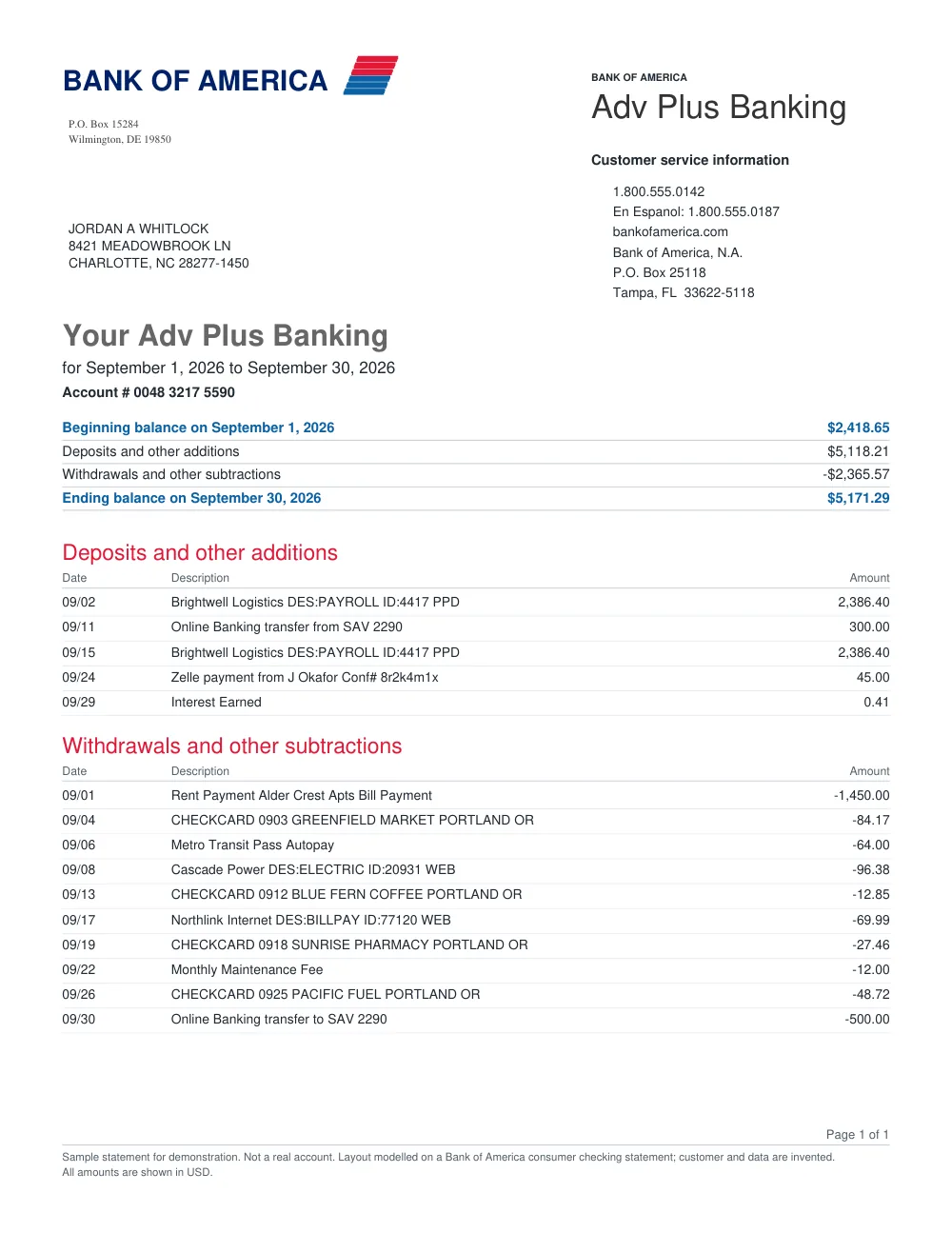
We did not run DocuClipper, so there is no head-to-head result and no DocuClipper accuracy figure here; its facts come from its own pages, checked 7 November 2026. We did test FastOCR. In our test on real statements from many banks across many countries, FastOCR got 99.7% of transaction rows right from digital PDFs and above 90% from scans. No row it marked Verified was wrong. Rows it could not prove were flagged Check or Unchecked for review. A row counts as right when its date, amount, money in or out and balance match the statement, and a missed row counts as wrong. Descriptions are not scored. To see the output yourself, open this sample statement with invented data in a Bank of America layout, and the Excel and CSV files FastOCR made from it.
How you pay, and how you leave
DocuClipper is a subscription; FastOCR sells pages once. DocuClipper's pricing page lists nine plans billed monthly or annually, and the pages in a monthly plan reset each billing cycle, so a quiet month's pages do not carry over. The trial runs 14 days, covers up to 120 pages and needs no card. The same pricing page says "No contracts. No lock-in." and that plans renew automatically.
The terms depend on how you pay. DocuClipper's refund policy says annual plans billed monthly carry a 12-month commitment, and that after the free trial it does not offer refunds for any reason. Its cancellation guide says a cancellation takes effect at the end of the billing period and the unused part is not prorated. Read those two pages before you pick a billing option.
FastOCR has no monthly plan for statements. You get free statement pages after sign-in, with no card, then buy a one-time Bank Statement Pack when you need more. Pack pages never expire, pages are counted only once the file is confirmed as a statement, and a failed conversion is refunded. If you convert a few statements a quarter, nothing renews in between.
Balance checks: both do the arithmetic, the flags live in different places
Both tools check the math. DocuClipper's reconciliation check tests that the end balance minus the start balance equals credits minus debits for each account and period, then shows Reconciled or Not Reconciled with the first cause. Its running-balance check compares each row's printed balance with the one before it and highlights, in red, the row where the chain breaks. You fix rows in its editor and the check reruns.
FastOCR puts the verdict in the file. Each row in the Excel and CSV output carries a Status of Verified, Check or Unchecked and a note with the reason, and Check rows are highlighted in the workbook. A Summary sheet gives each account's balance check. The flags travel with the spreadsheet to whoever opens it next. DocuClipper's help pages describe its row check on screen and do not say whether its export carries a per-row status.
Neither check proves every description is right. FastOCR's page says to check dates and descriptions against the statement, and rows from scans and photos are less certain than rows from a digital PDF. To see the output before you upload anything, open this sample statement with invented data and the Excel file FastOCR made from it.
Files in, files out, and accounting software
Both read digital and scanned statements. DocuClipper's feature page says image-based statements from scanners or mobile apps are supported, takes up to 100 files per upload and handles statements of 200 pages or more. FastOCR takes digital PDFs, scans and PNG, JPG or WebP photos, credit card statements included, one statement at a time on the website and up to 100 pages each. Loan statements are refused and not charged.
On output, DocuClipper lists more. Its pricing page lists Excel, CSV, QBO, IIF, OFX, QFX and QIF, its feature page adds Google Sheets, a Xero-compatible CSV and JSON through the API, and every plan includes direct QuickBooks Online and Xero integrations. It also lists Sage, NetSuite, Dynamics 365, Zapier and cloud storage. FastOCR gives you Excel, CSV and JSON plus .qbo, QuickBooks Online CSV, .qfx and .ofx files that you import yourself; the QuickBooks guide walks through it. It does not push transactions into your books.
Bank statement API: DocuClipper and FastOCR for developers
DocuClipper's API docs describe a personal access token, an upload URL, a job, a webhook when extraction completes, and transactions that come back with a verification verdict. Its pricing page lists a separate API plan at $199/month for 2,000 pages, then $0.10 a page, and says that plan excludes the web app, exports and integrations. A free DocuClipper test key needs no card.
The FastOCR Bank Statement API is three calls: create the statement, upload the file, then poll until it completes, with a download link for every format. The Python SDK wraps that in `extract_statement`, and the MCP server lets an AI agent convert a statement and read back whether it reconciles. It draws on the same statement pages as the website, so there is no separate API plan. The reference lists every field.
What DocuClipper reviewers say about billing
DocuClipper's Trustpilot page showed a TrustScore of 1.4 out of 5 from 38 reviews on 7 November 2026. Most of the complaints are about billing: charges after cancelling, and buyers who did not expect the 12-month term. 38 reviews is a small sample, and they say little about the extraction itself. We could not open its G2 or Capterra pages, so we do not quote them.
Choose DocuClipper if
- You want direct QuickBooks Online or Xero sync, or integrations it lists with Sage, NetSuite, Dynamics 365, Zapier and cloud storage.
- You batch-convert: it takes up to 100 files per upload and statements of 200 pages or more.
- You need QIF, IIF or Google Sheets output, which FastOCR does not produce.
- Invoices, receipts, checks, brokerage statements or W-2 and 1099 forms go through the same tool.
- Your team needs shared accounts: every plan includes unlimited users, Business adds audit logs and team management, and Enterprise adds SAML single sign-on.
- You need a vendor with a SOC 2 Type II report; DocuClipper's security page says it has one, shared under NDA.
FAQ
Is FastOCR a good DocuClipper alternative?
Yes, if you want to pay once for pages rather than keep a subscription, and you want each row flagged inside the Excel file. DocuClipper is the stronger pick for direct QuickBooks Online or Xero sync, uploads of many files at once, and invoices or tax forms.
Does DocuClipper lock you into a contract?
It depends on how you pay. Its pricing page says there are no contracts and you can cancel anytime. Its refund policy says annual plans billed monthly carry a 12-month commitment, and that there are no refunds after the free trial.
Is there a free DocuClipper alternative?
FastOCR gives you free bank statement pages after sign-in, with no card, and they do not expire. After that you buy one-time Bank Statement Packs. DocuClipper's free option is a 14-day trial of up to 120 pages, also without a card.
Does FastOCR connect directly to QuickBooks or Xero?
No. FastOCR gives you a .qbo file and a QuickBooks Online CSV for QuickBooks, a .qfx for Quicken and an .ofx for Xero, which you import yourself. DocuClipper's plans include direct QuickBooks Online and Xero integrations.
How does FastOCR check a bank statement?
It marks every row Verified, Check or Unchecked and writes the reason into the Excel and CSV files. A Summary sheet says whether each account reconciles. The check does not prove descriptions, so compare dates and descriptions with your statement.
How accurate is FastOCR on bank statements?
In our test on real statements from many banks across many countries, FastOCR got 99.7% of transaction rows right from digital PDFs and above 90% from scans. No row it marked Verified was wrong. Rows it could not prove were flagged Check or Unchecked for review. Descriptions were not scored, so check them yourself. We did not test DocuClipper.
Can FastOCR convert scanned or photographed bank statements?
Yes. Scans and PNG, JPG or WebP photos are read with OCR and may need more review than a digital PDF, and their Verified rows are less certain. Credit card statements work too. Loan statements are refused and you are not charged.
Does FastOCR have a bank statement API like DocuClipper?
Yes. The Bank Statement API returns Excel, CSV, JSON and the QuickBooks files, and there is a Python SDK and an MCP server. It uses the same statement pages as the website rather than a separate API plan.
Method
We did not sign up for DocuClipper or upload a file to it, so nothing here measures its output. Its facts come from its own pricing, feature, help, refund-policy, API and security pages, read on 7 November 2026; each table cell links its page. The Trustpilot figure is third party and was read the same day. FastOCR's side comes from its product code and its bank statement converter page, and its sample files are real output from a statement with invented data. FastOCR's accuracy comes from our own benchmark, run on 7 November 2026: every transaction row of real bank statements scored against checked answer keys. DocuClipper was not part of it.
Change log
- 7 November 2026: First published, with FastOCR's own bank statement accuracy test. DocuClipper facts checked on its own pages the same day.