ABBYY FineReader alternative: FineReader Online is gone, FastOCR runs in your browser
Short answer
FineReader Online is gone: ABBYY's own page says the service is no longer available and points to its desktop and iOS apps. Among ABBYY alternatives, FastOCR does the same job in a browser tab: drop in a scan, photo or PDF and get text, a searchable PDF, Word and Markdown. As an ABBYY PDF SDK alternative, it offers a hosted REST API, Python SDK and MCP server.
By the FastOCR team · Updated 4 November 2026 · Accuracy test run 31 October 2026
We make FastOCR. Accuracy figures come from our own test of each tool we scored, ours included, on the same scans; other facts link to each tool's own pages. How we tested
Try it here
Drop your file here
PDF, PNG, JPG, WebP, BMP, HEIC
PDF up to 1 GB · images up to 20 MB
Tips for a clear photo
- Lay the page flat.
- Use even light, with no shadows.
- Turn off the flash to avoid glare.
- Fill the frame with the page.
Verdict
Pick FastOCR if
- You came looking for FineReader Online and want OCR in a browser tab, with nothing to install.
- You want a scan turned into text, a searchable PDF, Word or Markdown without buying a yearly licence first.
- Your pages are in Urdu, Persian, Hindi, Bengali or Tamil, none of which FineReader names on its language list.
- You want an ABBYY PDF SDK alternative you can call as a hosted REST API today, with a Python SDK and MCP server, and no licence negotiated through sales.
Pick ABBYY FineReader if
- You edit and organize PDFs on your own computer every working day.
- You need document comparison or a watched folder, which ABBYY sells in its Corporate plan.
- OCR must run inside your own network or product, which is what ABBYY FineReader Engine is built for.
FastOCR and ABBYY FineReader side by side
| Factor | FastOCR | ABBYY FineReader |
|---|---|---|
| How you use it | FastOCRIn any browser, plus a hosted API and free offline Mac and Windows apps (beta). | ABBYY FineReaderDesktop apps for Windows and Mac, and an iOS app. FineReader Online has closed.Source |
| Cost to start | FastOCRImages free with no sign-up; PDFs need a free account. Paid plans and one-time packs on the pricing page. | ABBYY FineReader$69 a year for Mac; Windows Standard $99 a year or $16 a month; Corporate $165 a year.Source |
| Free trial | FastOCRFree use with no time limit. | ABBYY FineReader7-day trial, no payment required. Subscriptions renew automatically.Source |
| Searchable PDF | FastOCRFrom scanned PDFs and from every image upload; right-to-left text copies in the right order. | ABBYY FineReaderYes. Its feature list says 'Digitize to Searchable PDFs'.Source |
| Other outputs | FastOCRRaw text, Word (.docx) and Markdown. | ABBYY FineReaderEditable formats; its format list names DOCX, XLSX and TXT but does not separate input from output.Source |
| Recognition languages | FastOCR100+, detected automatically, including mixed pages. | ABBYY FineReader198. Urdu, Persian, Hindi, Bengali and Tamil are not on its list.Source |
| Picks the language for you | FastOCRYes. | ABBYY FineReaderNot statedSource |
| Batch conversion | FastOCROn paid plans, for PDFs. | ABBYY FineReaderYes, several documents at once with the same settings.Source |
| Accuracy on the six scripts shown | FastOCRLowest or tied-lowest share of characters wrong on 6 of 6 scripts shown. Lower is better. | ABBYY FineReaderNot tested |
Why FastOCR
Scanned PDFs
Scanned PDF in, searchable PDF out; text copies in the right order, including right-to-left.
See Scanned PDFsFree use
Images: free, no sign-up, no watermark. PDFs: free account.
See Free useLanguages
100+ languages, detected automatically, including mixed pages.
Share of characters wrong on our evidence scans (lower is better): Arabic 2.6%, Urdu 9.1%, Bengali 7.4%, Tamil 2.2%, Chinese 1.0%.
See LanguagesFor developers
REST API, Python SDK, MCP server for AI agents, LangChain and LlamaIndex loaders.
See For developersOffline desktop apps
Free offline Mac and Windows apps (public beta): searchable PDF, text, Word and Markdown, nothing leaves your computer.
See Offline desktop apps
Proof
ABBYY FineReader PDF is paid desktop software, so it has no score. On the six scripts shown, FastOCR had the lowest or tied-lowest error rate on 6 of 6 (lower is better; gaps under 3 points count as ties), and read the Urdu page at 9.1% wrong, a script ABBYY does not list.
The scan: a page of the Urdu book Tota Kahani (written 1801)
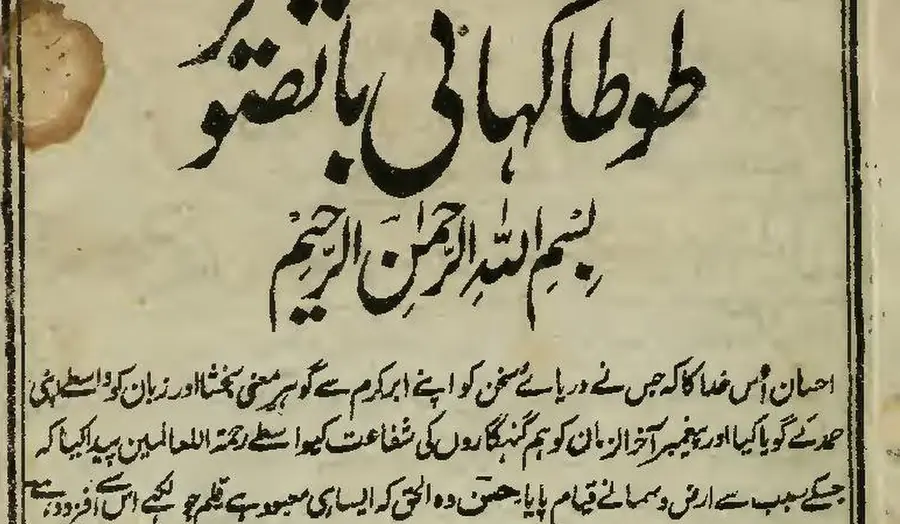
First body line, as printed (Wikisource transcription)
احسان اُس خدا کا کہ جس نے دریائے سخن کو اپنے ابر کرم سے گو ہرِ معنی بخشا اور زبان کو واسطے اپنی
- 9.1% of characters wrong
FastOCR
published by us
احسان اُس خدا کا کہ جس نے دریائے سخن کو اپنے ابر کرم سے گو ہر معنی بخشا اور زبان کو واسطے اپنی
- 9.2% of characters wrong
imagetotext.info
free web tool
احسان اُس خدا کا کہ جس نے دریائے سخن کو اپنے ابر کرم سے گو ہر معنی بخشا اور زبان کو واسطے اپنی
- 30.4% of characters wrong
OCR.space
default Engine 2
احسان أس مداكاكيج سنءريات سخن كواب ابركرم ← كوبر معى تختا اورزيان كوداسطيى
- 55.3% of characters wrong
Tesseract 5.5.4
the engine NewOCR says it uses
ا احمان اس دا اجس ےه در را سخ نکو ان ارک سےکوس ین یناد زا نک ری
- 99.6% of characters wrong
OnlineOCR.net
no Urdu option
tA)K11 tAirk.,....11.30,t4 ikitt r CIO 4 %;114iiii
How FastOCR works
Searchable PDF that copies in reading order
احسان اُس خدا کا کہ جس نے دریائے سخن کو اپنے ابر کرم سے گو ہر معنی بخشا اور زبان کو واسطے اپنی
Select and paste: Urdu, Arabic and Hebrew come out right to left, and two-column pages come out column by column.
Word file with paragraphs and tables
| Item | Qty | Total |
| Paper | 4 | 18.00 |
| Toner | 1 | 64.50 |
Prose reflows into editable paragraphs; ruled tables come back as real Word tables. PDF to Word
Bank statement to Excel, CSV or QuickBooks
| Date | Description | Amount | Balance |
| 09/01 | Rent payment | -1,450.00 | 968.65 |
| 09/02 | Payroll deposit | 2,386.40 | 3,355.05 |
| 09/04 | Grocery store | -84.17 | 3,270.88 |
One row per transaction, for US and UK statements in English (example rows invented). Bank statement converter
Is FineReader Online still available?
No. ABBYY's end-of-life page says "This service is no longer available." It sends readers to FineReader PDF 16 for Windows, FineReader PDF for Mac and FineReader PDF for iOS, each with a free trial. ABBYY does not name a browser tool to replace it, so anyone who used FineReader Online to convert a file without installing software has to look elsewhere.
FastOCR does that job in any browser. Drop in a photo, screenshot or scanned page and you get the text and a searchable PDF, with Word and Markdown downloads next to them. Images need no account and carry no watermark. For a scanned PDF, sign in with a free account and make it searchable; the text layer copies in reading order, right-to-left scripts included. You can also translate the text of a finished image or tidy it with AI Polish.
ABBYY PDF SDK alternative for developers
If you searched for an ABBYY PDF SDK, ABBYY's developer OCR product is FineReader Engine, an OCR SDK you build into your own software. Its features page says you can create desktop or server applications for Windows, Linux or Mac and deploy them in the cloud or on virtual machines, under Developer and Runtime licences. No prices are shown; you book a demo or contact sales. It is an enterprise product, and the right choice when recognition has to happen on hardware you control.
FastOCR takes the hosted route. With the OCR API you send a file over HTTPS, wait for the job and download text or a searchable PDF. The Python SDK is fastocr-sdk on PyPI, the MCP server fastocr-mcp lets AI agents read documents through the same API, and LangChain and LlamaIndex loaders are published too. Keys are self-serve with a free monthly allowance; the docs show each call.
The trade-off is where the document goes. Every file sent to the FastOCR API is uploaded to FastOCR for processing. A FineReader Engine deployment can keep files inside your own network, which matters for some regulated work.
Desktop: FineReader PDF or the free FastOCR apps
FineReader PDF is a paid desktop suite. ABBYY's pricing page lists FineReader PDF for Mac at $69 a year, Standard for Windows at $99 a year or $16 a month, and Corporate at $165 a year. Every plan starts with a 7-day trial that asks for no payment. ABBYY's Corporate plan adds document comparison and automated Hot Folder conversion of up to 5,000 pages a month.
FastOCR's free Mac and Windows apps read files offline and save a searchable PDF, text, Word and Markdown, so nothing leaves your computer. They rely on Apple Vision and Windows OCR, not the website's engine, so the accuracy figures here do not apply to them. Both are unsigned public betas, and your system shows a warning the first time you open one.
FineReader does much more on the desktop. It edits and organizes PDFs, and its Corporate plan compares documents. If that is your daily work, the FastOCR apps are not a replacement; they only recognise text and write the output files.
Languages: a longer list against automatic detection
FineReader PDF's specifications page says it supports 198 recognition languages in all combinations, a longer list than FastOCR's 100+. Arabic, Chinese, Japanese, Korean, Thai and Hebrew are on it. Urdu, Persian, Hindi, Bengali and Tamil are not named. That does not prove FineReader fails on them; it means ABBYY does not advertise them.
FastOCR detects the language of each page itself, so a mixed Urdu and English letter needs no setting. On our public-domain test scans it got 9.1% of Urdu characters wrong, 7.4% of Bengali and 2.2% of Tamil; lower is better.
Free and open-source alternatives to ABBYY
If you want free software you run yourself, Tesseract is a widely used open-source OCR engine. Its documentation describes a command-line tool and library with no built-in window. Installed locally with the right language pack, it got 55.3% of our Urdu page's characters wrong against FastOCR's 9.1%, and 20.4% of the Arabic page against 2.6%; lower is better. See FastOCR vs Tesseract for the full run.
ABBYY Screenshot Reader alternative
ABBYY's Screenshot Reader page still sells it as a perpetual licence with a free trial and shows no end-of-life notice. To pull text from a screenshot without installing anything, drop the image into screenshot to text and copy the result. The FastOCR Chrome extension lets you copy text from anything on screen in the browser.
FastOCR's other free extras need no install either: browser PDF tools to merge, split, compress and sign, and bank statements to Excel, CSV and QuickBooks.
Choose ABBYY FineReader if
- You want a full desktop PDF suite; ABBYY's pricing page lists editing and organizing PDFs next to OCR.
- Your files must stay on machines you control and you need more than plain recognition offline.
- You process large batches through a watched folder; ABBYY Corporate includes Hot Folder conversion of up to 5,000 pages a month.
FAQ
Is ABBYY FineReader Online still available?
No. ABBYY's end-of-life page says the service is no longer available and points to FineReader PDF for Windows, Mac and iOS. FastOCR works in any browser: drop in an image or scanned PDF and get text and a searchable PDF.
What is a free alternative to ABBYY FineReader?
FastOCR. Images are free with no sign-up or watermark, scanned PDFs need a free account, and you get text, a searchable PDF, Word and Markdown. It does not edit PDFs, so FineReader stays ahead for desktop editing.
Is there an ABBYY PDF SDK alternative?
FastOCR has a hosted REST API, a Python SDK (fastocr-sdk) and an MCP server (fastocr-mcp), with self-serve keys. It runs on FastOCR, not on your servers. If OCR must stay inside your network, ABBYY FineReader Engine fits better.
How much does ABBYY FineReader PDF cost?
ABBYY's pricing page lists $69 a year for Mac, $99 a year or $16 a month for Windows Standard, and $165 a year for Corporate. All plans have a 7-day trial with no payment required, checked 4 November 2026.
Does ABBYY FineReader support Urdu or Hindi?
No. Neither is on FineReader PDF's list of 198 recognition languages, nor are Persian, Bengali or Tamil; that is advertised, not tested. FastOCR detects all five automatically. On our test scans it got 9.1% of Urdu characters wrong, 7.4% of Bengali and 2.2% of Tamil, lower is better.
Can FastOCR make a searchable PDF like FineReader?
Yes. A scanned PDF comes back with an invisible text layer under the page image, so you can search and copy, and right-to-left text copies in order. Every image upload also gets a one-page searchable PDF.
Does FastOCR keep my files on my computer?
On the website and API, no: files are uploaded and processed by FastOCR. The free Mac and Windows apps work offline and keep files on your computer. For editing PDFs on your own machine, FineReader PDF is the stronger tool.
Method
ABBYY facts come from its own pages: pricing, specifications and the full feature list, checked on 4 November 2026 (prices re-read on the pricing page that day), plus the FineReader Online end-of-life, FineReader Engine and Screenshot Reader pages. A fact ABBYY does not state is shown as Not stated, never as No. We did not run ABBYY's software. The accuracy figures are from our free-tool test of 31 October 2026: one public-domain scanned page per script, scored as the share of characters wrong against the Wikisource text, so lower is better. FastOCR's outputs date from 25 October 2026.
Change log
- 27 June 2026: First published.
- 31 October 2026: Rewritten with sourced ABBYY facts.
- 4 November 2026: Moved to the comparison template; FineReader Online answer first, languages, open-source and accuracy sections added, prices re-checked.