Can ChatGPT Do OCR? How It Reads Images and Scanned PDFs, and Its Limits
Short answer
Yes, ChatGPT can do OCR on a clear photo or screenshot: upload it and ask for the exact text. Can ChatGPT OCR a PDF? OpenAI says it reads text and images in PDFs, but you get a chat reply, and OpenAI warns its vision models make mistakes. When ChatGPT can't extract text from PDF scans, or you need exact text or a searchable PDF, use a dedicated OCR tool.
By the FastOCR team · Updated 4 November 2026 · Accuracy test run 31 October 2026
We make FastOCR. Accuracy figures come from our own test of each tool we scored, ours included, on the same scans; other facts link to each tool's own pages. How we tested
Try it here
Drop your file here
PDF, PNG, JPG, WebP, BMP, HEIC
PDF up to 1 GB · images up to 20 MB
Tips for a clear photo
- Lay the page flat.
- Use even light, with no shadows.
- Turn off the flash to avoid glare.
- Fill the frame with the page.
Verdict
Pick FastOCR if
- You need the exact words on the page, every line, to paste into a contract, a citation or a spreadsheet.
- You want your scan back as a searchable PDF, or the text as Word or Markdown, not as a chat message.
- The file is a long scanned PDF, or a right-to-left page (Arabic, Urdu, Persian) that must come back as a searchable PDF that copies in the right order.
- An agent or script needs OCR: FastOCR has a REST API, a Python SDK and an MCP server.
Pick another tool if
- You want a summary, an answer or a translation about a page rather than a copy of it: ChatGPT.
- It is one clear photo or screenshot and you will read the reply against the page anyway: ChatGPT.
Comparison table
| Tool | What you get back | Scanned PDFs | Limits, as published | For developers |
|---|---|---|---|---|
| FastOCR (our tool)Our tool | What you get backThe recognised text, plus a searchable PDF, Word and Markdown | Scanned PDFsSearchable PDF of the whole file, text in reading order, right-to-left included | Limits, as publishedImages: free with no sign-up, with a small daily cap until you sign in. PDFs: free account with a monthly page allowance. See pricing. | For developersOCR API, Python SDK, MCP server, LangChain and LlamaIndex loaders |
| ChatGPT | What you get backA chat reply; OpenAI says vision models can read visible text and can make mistakesSource | Scanned PDFsAnalyzes text and images in PDFs and answers in the chatSource | Limits, as publishedFree users: 3 file uploads a day. Everyone: 80 files every 3 hours, 512 MB and 2 million tokens per fileSource | For developersThe OpenAI API takes images as input; you prompt a model to read the textSource |
Why FastOCR
Photos and screenshots
Every image upload gets raw text and a single-page searchable PDF, plus Word and Markdown.
See Photos and screenshotsScanned PDFs
Scanned PDF in, searchable PDF out; text copies in the right order, including right-to-left.
See Scanned PDFsLanguages
100+ languages, detected automatically, including mixed pages.
Share of characters wrong on our evidence scans (lower is better): Arabic 2.6%, Urdu 9.1%, Bengali 7.4%, Tamil 2.2%, Chinese 1.0%.
See LanguagesFor developers
REST API, Python SDK, MCP server for AI agents, LangChain and LlamaIndex loaders.
See For developersOffline desktop apps
Free offline Mac and Windows apps (public beta): searchable PDF, text, Word and Markdown, nothing leaves your computer.
See Offline desktop apps
Proof
ChatGPT is not in this chart: we have not tested it. The chart compares dedicated OCR tools on the same six scripts shown (Arabic, Urdu, Bengali, Tamil, Chinese and English). Lower is better.
% of characters wrong by script, lower is better
- FastOCR
- OCR.space Engine 3
- imagetotext.info
- OCR.space default Engine 2
- Tesseract 5.5.4 (the engine NewOCR says it uses)
- PDF24
- Chinese
- FastOCR 1.0%OCR.space E3: No scoreOCR.space E2 3.0%Tesseract 71.9%PDF24 3.2%
- Urdu
- FastOCR 9.1%OCR.space E3 19.6%imagetotext.info 9.2%OCR.space E2 30.4%Tesseract 55.3%PDF24 69.0%
- Bengali
- FastOCR 7.4%OCR.space E3 11.2%imagetotext.info 7.9%OCR.space E2 100.0%Tesseract 31.7%PDF24 18.6%
- Arabic
- FastOCR 2.6%OCR.space E3 2.9%imagetotext.info 2.9%OCR.space E2: Not supportedTesseract 20.4%PDF24 35.5%
- Tamil
- FastOCR 2.2%OCR.space E3: No scoreOCR.space E2 99.8%Tesseract 8.5%PDF24 9.2%
- English
- FastOCR 3.3%OCR.space E3: No scoreOCR.space E2 4.5%Tesseract 8.5%PDF24 10.1%
Can ChatGPT do OCR?
Yes. ChatGPT reads text in images: attach a photo or a screenshot, ask for the text, and a vision model types out what it sees. OpenAI's API guide says vision-capable models can read visible text in images. The same guide lists the limits. It says vision models can make mistakes, may not perform well on non-Latin alphabets such as Japanese or Korean, and may misread rotated or upside-down text. It suggests enlarging small text. ChatGPT has no separate OCR mode to switch on, and OpenAI's pages do not name an OCR engine behind it. Source: OpenAI vision guide, checked 4 November 2026.
What that means in practice:
- Good fit: a clear photo, a screenshot or a short page, when you want the gist or a quick copy you will read through anyway.
- Check every line: the text comes back as a written reply. A model can tidy a phrase, drop a line or reorder a table while answering, and there is no confidence score or box on the page to check it against. Names, numbers, quotes and citations need a proofread.
- What it does not return: a searchable copy of your scan, or a Word or Markdown file of the page.
How to OCR an image or PDF with ChatGPT
The steps that give ChatGPT the best chance of a faithful copy: 1. Crop the photo to the text and keep it upright. OpenAI notes that rotated text can be misread. 2. Attach the image or PDF with the + button in the message box. 3. Ask for a transcription, not a summary: "Copy all the text in this image exactly as written. Do not correct, translate or leave anything out." 4. For a PDF, ask for one page at a time, so a long reply is not cut short. 5. Read the reply against the page, line by line, before you use it.
If you would rather skip the checking, run the page through an OCR tool first and paste the result into ChatGPT. Our OCR for ChatGPT page shows that workflow with plain text and Markdown.
Can ChatGPT OCR a PDF?
Often, if the PDF is short. OpenAI's help page says ChatGPT can analyze both text and images in PDFs, including charts and diagrams, and that you then ask questions about the contents. That is a promise about answering questions, not about a full transcript of a long scan. Source: OpenAI help center, checked 4 November 2026.
Why ChatGPT can't extract text from a PDF, using the limits OpenAI publishes:
- Free users are limited to 3 file uploads per day. Everyone is limited to 80 files every 3 hours, and OpenAI may lower these limits at peak hours.
- Text and document files are capped at 2 million tokens per file, and documents at 512 MB.
- PDFs saved as project files or GPT knowledge are handled differently from a PDF attached to a chat, and embedded images may not be included automatically.
- A long scanned book does not fit in one answer, so you end up asking for it page by page and checking each reply.
If you see "No text could be extracted from this file", the PDF may be a scan with no text layer under the picture, though OpenAI does not document the cause. Send the page as an image instead, or OCR the PDF first. PDF to text returns the text of every page along with a searchable PDF.
Where a dedicated OCR tool is the better choice
An OCR engine returns the text it recognised on the page. It is not answering a question, so it has no reason to rephrase. That matters in six situations:
- Exact, unchanged text. Contracts, invoices, quotes and references need the words as printed, not a fluent version of them.
- A searchable PDF. FastOCR gives every image a searchable PDF and turns scanned PDFs into searchable PDFs, so you can search, select and copy inside the original page.
- Long PDFs. One upload returns the whole document, page by page, as text and a searchable PDF, not as a chat reply you request page by page. PDFs need a free account, which includes a monthly page allowance; pricing lists plans and page packs for more.
- Right-to-left scripts. FastOCR reads 100+ languages and detects them itself. In its searchable PDFs, Arabic, Urdu, Persian and Hebrew copy out in the right order. OpenAI's guide names non-Latin alphabets as a weak spot and says nothing specific about right-to-left text.
- Privacy. Both ChatGPT and any OCR website process your file on their servers. When a document must stay on your computer, the free FastOCR apps for Mac and Windows, in public beta, work offline. They use the text recognition built into macOS and Windows, so the test numbers on this page are for the website, not the apps.
- Agents and code. The FastOCR API returns text and a searchable PDF, with a Python SDK, LangChain and LlamaIndex loaders, and an MCP server that lets an AI agent call real OCR on a local PDF or image.
Searchable PDF that copies in reading order
احسان اُس خدا کا کہ جس نے دریائے سخن کو اپنے ابر کرم سے گو ہر معنی بخشا اور زبان کو واسطے اپنی
Select and paste: Urdu, Arabic and Hebrew come out right to left, and two-column pages come out column by column.
Word file with paragraphs and tables
| Item | Qty | Total |
| Paper | 4 | 18.00 |
| Toner | 1 | 64.50 |
Prose reflows into editable paragraphs; ruled tables come back as real Word tables. PDF to Word
Bank statement to Excel, CSV or QuickBooks
| Date | Description | Amount | Balance |
| 09/01 | Rent payment | -1,450.00 | 968.65 |
| 09/02 | Payroll deposit | 2,386.40 | 3,355.05 |
| 09/04 | Grocery store | -84.17 | 3,270.88 |
One row per transaction, for US and UK statements in English (example rows invented). Bank statement converter
How accurate is ChatGPT OCR?
We have not measured ChatGPT, so this page gives it no error rate. OpenAI's own guide is the best published answer: vision models can make mistakes, and non-Latin alphabets, small text and rotated text are named as weak spots. If accuracy matters, test it on one of your own pages and compare the reply with the original, character by character.
What we did measure is dedicated OCR. On 31 October 2026 we scored free OCR tools on public-domain scanned book pages, one per script, against each page's Wikisource text; FastOCR's output came from its production API on 25 October. This page shows six scripts: Arabic, Urdu, Bengali, Tamil, Chinese and English. Even here the spread is wide. With the right language pack, Tesseract got 55.3% of the Urdu page's characters wrong and 20.4% of the Arabic page. FastOCR got 9.1% and 2.6% wrong. Lower is better.
All the numbers are in the free OCR tools comparison and Arabic OCR tools.
The scan: a page of the Urdu book Tota Kahani (written 1801)
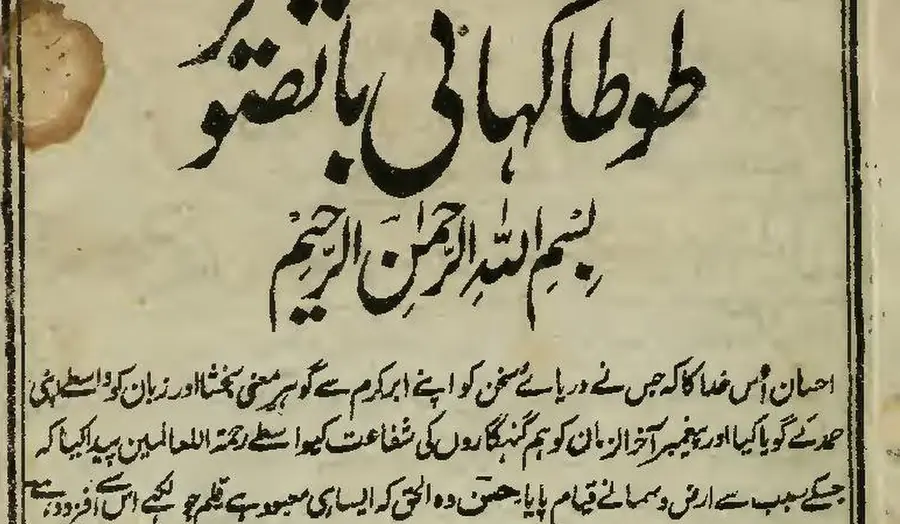
First body line, as printed (Wikisource transcription)
احسان اُس خدا کا کہ جس نے دریائے سخن کو اپنے ابر کرم سے گو ہرِ معنی بخشا اور زبان کو واسطے اپنی
- 9.1% of characters wrong
FastOCR
published by us
احسان اُس خدا کا کہ جس نے دریائے سخن کو اپنے ابر کرم سے گو ہر معنی بخشا اور زبان کو واسطے اپنی
- 9.2% of characters wrong
imagetotext.info
free web tool
احسان اُس خدا کا کہ جس نے دریائے سخن کو اپنے ابر کرم سے گو ہر معنی بخشا اور زبان کو واسطے اپنی
- 30.4% of characters wrong
OCR.space
default Engine 2
احسان أس مداكاكيج سنءريات سخن كواب ابركرم ← كوبر معى تختا اورزيان كوداسطيى
- 55.3% of characters wrong
Tesseract 5.5.4
the engine NewOCR says it uses
ا احمان اس دا اجس ےه در را سخ نکو ان ارک سےکوس ین یناد زا نک ری
- 99.6% of characters wrong
OnlineOCR.net
no Urdu option
tA)K11 tAirk.,....11.30,t4 ikitt r CIO 4 %;114iiii
Use both: OCR first, then ChatGPT
The split that works: let OCR get the words, then let ChatGPT do what it is good at, such as summarising, rewriting, answering questions or translating. Read the OCR text against the page once, then paste it into the chat. FastOCR returns the text, a searchable PDF, Word and Markdown from one upload, so you check the words once and give ChatGPT a clean copy. ChatGPT then works from text you have already checked instead of guessing from pixels, and a clean paste is shorter than a stack of page images.
Two pages cover this in detail: OCR for ChatGPT for pasting into a chat, and PDF OCR for LLMs for pipelines that feed scanned PDFs to a model. To stay in one place, FastOCR has AI Polish to clean up recognised text and Translate; both work on a finished single image, not on PDFs.
ChatGPT OCR API, and OCR for AI agents
OpenAI's API has no separate OCR endpoint. You send an image to a vision-capable model and ask it to read the text, so the result is a model reply with the same caveats as in the chat app. Source: OpenAI vision guide.
An OCR API returns recognised text instead. FastOCR's REST API returns the text and a searchable PDF, and its free monthly pages are shared with PDFs on the website. The Python SDK wraps it, LangChain and LlamaIndex loaders turn scans into documents for retrieval, and the MCP server gives AI assistants and coding agents that support MCP a tool for real OCR. The agent hands over the file and gets back the text on the page.
When another tool is the better choice
- You want to ask about a document, not copy it: ChatGPT can summarise, explain, pull out one figure or translate in the same chat.
- You have one clear, upright photo in English or another Latin-script language and will read the reply against it anyway.
- You already pay for ChatGPT and only need text now and then, so a second tool is not worth learning.
- It is a one-off page and you would rather not open a second tool for a quick copy.
FAQ
Can ChatGPT do OCR?
Yes, for a clear photo, a screenshot or a short page. Upload it and ask for the text. OpenAI says its vision models can read visible text and can also make mistakes, so check anything that must be exact, such as names, numbers and quotes, against the page.
Does ChatGPT have OCR, and what OCR does it use?
ChatGPT has no separate OCR mode or setting, and OpenAI's pages do not name an OCR engine. You attach an image or PDF and a vision-capable model reads it and replies in the chat. An OCR engine, by contrast, returns the text it recognised on the page.
Can ChatGPT OCR a PDF?
Often, if it is short. OpenAI's help page says ChatGPT can analyze both text and images in PDFs. For a long scan it is a poorer fit: free users get 3 file uploads a day, the answer arrives as chat text, and you get no searchable PDF back.
Why can't ChatGPT extract text from my PDF?
That message usually points to a scan with no text layer, though OpenAI does not document the cause. Other limits are the daily upload limit for free users and long files whose replies get cut short. Send one page as an image, or OCR the PDF first.
How accurate is ChatGPT at OCR?
We have not scored ChatGPT, so we cannot give a number. OpenAI names non-Latin alphabets, small text and rotated text as weak spots. On our Urdu scan, dedicated tools ranged from 9.1% of characters wrong for FastOCR to 55.3% for Tesseract. Lower is better.
Is there a ChatGPT OCR API?
Not as a separate product. OpenAI's API accepts images as input, and you prompt a model to read the text, so you get a model reply. FastOCR's REST API is an OCR API: it returns the recognised text and a searchable PDF, with a Python SDK alongside.
Can an AI agent call real OCR instead of reading the image itself?
Yes. FastOCR's MCP server gives assistants and coding agents that support MCP an OCR tool for a local PDF or image, using a FastOCR API key. LangChain and LlamaIndex loaders do the same job in retrieval pipelines that feed scans to a model.
Can I use ChatGPT and OCR together?
Yes, and it is the safest way. Run OCR first to get the exact text, check it once against the page, then paste it into ChatGPT to summarise, rewrite or translate. FastOCR's AI Polish and Translate do the same for a finished single image.
Method
- ChatGPT was not tested. Every statement about it comes from OpenAI's help center and API vision guide, re-read on 4 November 2026. OpenAI may change them.
- The dedicated OCR tools ran on 31 October 2026. FastOCR's output was taken from its production API on 25 October 2026. We plan to re-run before quoting these numbers after January 2027.
- Test set: scanned book pages from Wikimedia Commons, each public domain or CC0, one per script. This page shows six: Arabic, Urdu, Bengali, Tamil, Chinese and English. The reference for each is its Wikisource transcription.
- Scoring: share of characters wrong, ignoring spaces, punctuation and Arabic diacritics; lower is better. Wikisource itself differs from our own proofread text by 1% to 6%, so treat gaps below about 3 points as a tie.
- Image sizes: the Arabic, Urdu and English pages went to FastOCR at 500 pixels wide and to the other tools at 1,280 pixels.
- Tesseract 5.5.4 ran on our machine with the matching language pack, and OCR.space ran on its public demo key.
Change log
- 21 June 2026: First published.
- 31 October 2026: Rewritten around OpenAI's published limits, with a script-by-script test of dedicated OCR tools.
- 4 November 2026: Retitled to answer the question first. Added how to OCR with ChatGPT, when a dedicated tool is the better choice, and OCR for AI agents. OpenAI quotes re-read.