Urdu OCR Guide: Extract Urdu Text from Images and PDFs
Updated 31 October 2026 · 7 min read
To extract Urdu text from an image, upload it on the Urdu image to text page. To extract Urdu text from a PDF, use the Urdu PDF to text page. Both give you copyable Urdu OCR text.
On our Urdu test page, FastOCR got 9.1% of the characters wrong. The open-source Tesseract engine got 55.3% wrong. Lower is better. The numbers are in the accuracy section.
How to extract Urdu text in four steps
1. Add the file
A photo or screenshot goes in as an image. A scanned book or form goes in as a PDF.
2. Wait for the text
You do not pick a language. The Urdu text appears on the results page.
3. Check it
Read the result against the page once. Urdu dots and small marks are where errors hide.
4. Copy or download
Copy the text, or download it as .txt, Word or Markdown. PDFs also give a searchable PDF.
Try 3 images a day without an account. Sign in for unlimited free image OCR. A phone shows Use camera next to Choose file, so you can photograph a page directly. If you only need the tool, the Urdu OCR page takes both images and PDFs.
Urdu photo or screenshot to text
Use this for a photo of a page, a screenshot of a news post, or a picture of a sign or certificate. FastOCR reads PNG, JPG, GIF, WebP, BMP and HEIC files. The result is plain Urdu text in right-to-left order, ready to copy into a message or a document.
Image results can also be downloaded as Word or Markdown from the same results page, or you can start from the image to Word or image to Markdown page.
Scanned Urdu PDF to text
A scanned book or form is a PDF of pictures, so you cannot select or search the Urdu in it. Upload it and FastOCR reads every page. PDFs need a free account, and the Free plan includes 50 pages a month.
Faded or damaged pages read worse, so check those by eye. For old Urdu books, see our guide to Urdu madrasa books.
Searchable Urdu PDF
For a PDF, FastOCR can also give you a searchable PDF: the same scan with the Urdu text hidden behind it. You can search it and copy from it. It works for PDFs, not for photos. Our make a PDF searchable page has the details.
Urdu runs right to left, and PDF viewers differ in how they copy it. In macOS Preview, poppler and MuPDF, copied Urdu lines come out in the right order. Chrome's built-in viewer can scramble Latin words and brackets inside an Urdu line, as it does with other Arabic and Hebrew PDFs. If a copy looks wrong in Chrome, try another viewer or use the text download.
Urdu to Word and Markdown
The Word file keeps the text in reading order and marks Urdu paragraphs as right to left, so Word shows them from the right edge. It rebuilds paragraphs and ruled tables. It does not keep the full page layout, so check headings and spacing. Start from PDF to Word or image to Word.
Markdown is text only. It gives clean paragraphs, but no tables or pictures yet. Start from PDF to Markdown.
Tips for Nastaliq scans and photos
- Keep the page straight. Nastaliq lines already slope. A tilted photo makes the slope harder to read. Rotate it upright before you upload.
- Crop to the text. Cut off table edges, hands and desk. Fill the frame with the page.
- Make the dots sharp. One dot or two separates many Urdu letters. A blurred photo loses them first.
- Use even light and turn off the flash. Shadows and glare hide small marks.
- Shoot sharp and close. A phone photo is harder than a flat scan, because of shadows, angle and blur.
- Check the result. Read the output once against the page, especially names and numbers.
How accurate is Urdu OCR?
We ran one scanned page of the Urdu book Tota Kahani (written in 1801, in Nastaliq) through FastOCR and six other tools, and scored each against the Wikisource text. The score is character error rate: the share of characters the tool got wrong, so lower is better. FastOCR got 9.1% wrong and the web tool imagetotext.info got 9.2% wrong. That is a tie, because gaps under about 3 points are noise. OCR.space got 19.6% wrong on Engine 3 and 30.4% on its default Engine 2. Tesseract got 55.3% wrong and PDF24 got 69.0% wrong. OnlineOCR.net has no Urdu option and returned Latin garbage (99.6% wrong).
The scan: a page of the Urdu book Tota Kahani (written 1801)
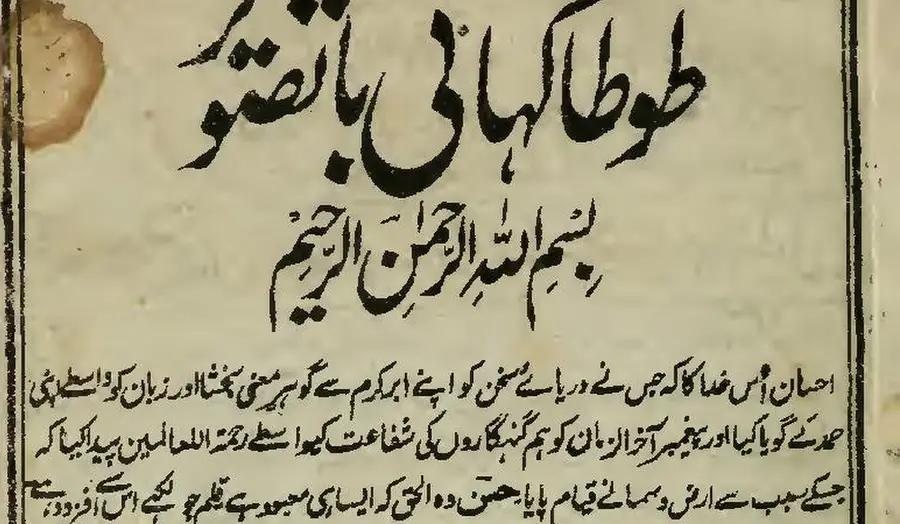
First body line, as printed (Wikisource transcription)
احسان اُس خدا کا کہ جس نے دریائے سخن کو اپنے ابر کرم سے گو ہرِ معنی بخشا اور زبان کو واسطے اپنی
- 9.1% of characters wrong
FastOCR
published by us
احسان اُس خدا کا کہ جس نے دریائے سخن کو اپنے ابر کرم سے گو ہر معنی بخشا اور زبان کو واسطے اپنی
- 9.2% of characters wrong
imagetotext.info
free web tool
احسان اُس خدا کا کہ جس نے دریائے سخن کو اپنے ابر کرم سے گو ہر معنی بخشا اور زبان کو واسطے اپنی
- 30.4% of characters wrong
OCR.space
default Engine 2
احسان أس مداكاكيج سنءريات سخن كواب ابركرم ← كوبر معى تختا اورزيان كوداسطيى
- 55.3% of characters wrong
Tesseract 5.5.4
the engine NewOCR says it uses
ا احمان اس دا اجس ےه در را سخ نکو ان ارک سےکوس ین یناد زا نک ری
- 99.6% of characters wrong
OnlineOCR.net
no Urdu option
tA)K11 tAirk.,....11.30,t4 ikitt r CIO 4 %;114iiii
Share of Urdu characters wrong, lower is better
FastOCR
9.1%imagetotext.info
9.2%OCR.space Engine 3
19.6%OCR.space Engine 2 (default)
30.4%Tesseract 5.5.4, Urdu pack
55.3%PDF24
69%OnlineOCR.net (no Urdu option)
99.6%
This is one page, not a promise for your documents. The same test covers seven other scripts; the full table is in the free OCR tools comparison. For a tool-by-tool review of Urdu OCR, with the fair notes on each, read the best Urdu OCR tools. For handwriting, which we did not measure, there is an Urdu handwriting OCR page.
How we tested
- Dates: the other tools ran on 31 October 2026. FastOCR's output came from its production API on 25 October 2026. We will re-run the test before quoting these numbers after January 2027.
- Page: one scanned Urdu book page from Wikimedia Commons (public domain). The reference is its Wikisource transcription.
- Score: character error rate after removing spaces, punctuation and diacritics. The Wikisource text differs from our own proofread key by 1% to 6%, so gaps under about 3 points are noise.
- FastOCR got a 500-pixel-wide image; the other tools got 1,280 pixels.
- Tesseract 5.5.4 ran locally with the Urdu language pack. OCR.space ran on its public demo key.
- We tested no handwriting and timed no speed.
Frequently asked questions
How do I extract Urdu text from an image?
Open the Urdu image to text page, choose a photo or screenshot, and wait for the result. You do not need to pick a language. Copy the text or download it. Read it once against the image, because Urdu dots and small marks are where errors hide.
How do I extract Urdu text from a PDF?
Open the Urdu PDF to text page and upload the PDF. PDFs need a free account, and the Free plan includes 50 pages a month. You get the text, and a searchable PDF with the Urdu text behind the scan. You can also download Word and Markdown.
Is Urdu OCR free?
Image OCR is free. Try 3 images a day without an account. Sign in for unlimited free image OCR. PDFs use pages from your plan.
How accurate is Urdu OCR?
On one scanned page of an 1801 Urdu book (Tota Kahani, set in Nastaliq), FastOCR got 9.1% of the characters wrong, where lower is better. Tesseract 5.5.4 with the Urdu pack got 55.3% wrong. This is one page, so treat it as a guide and test your own pages. Gaps under about 3 points are noise.
Can OCR read Nastaliq?
Yes, some can. Nastaliq slopes down from right to left and letters stack, which makes it harder than Naskh. The test page in this guide is Nastaliq, and FastOCR read it with 9.1% of characters wrong. Most other tools in the test did much worse, so the tool you pick matters.
Can I get a Word file from Urdu text?
Yes. The Word export keeps the text in reading order and sets right-to-left direction on Urdu paragraphs. It rebuilds paragraphs and ruled tables, not the full page layout, so expect to check the formatting.
Does it read handwritten Urdu?
We did not measure handwriting, so we make no accuracy claim. Try a page and check the result against the original.
What happens to my files?
Your file is uploaded to our servers to be read. The privacy policy says uploaded files and results are deleted automatically 30 days after upload.
Read how we handle files in the privacy policy.
Have an Urdu page to read?
Try 3 images a day without an account. Sign in for unlimited free image OCR.